Solved

SCIM-Based User Provisioning with Azure Active Directory Free

  • February 24, 2022
  • 4 replies
  • 288 views

Forum|alt.badge.img

Hello,

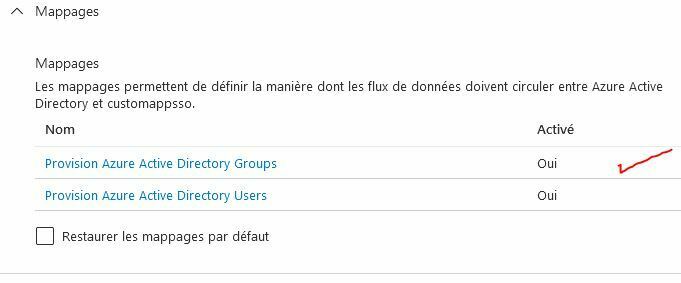
I'm looking to add groups with Azure Active Directory Free.

The users are well synchronized but not the groups. Is it mandatory to upgrade to Azure Active Directory P1 for this feature?


Thank you

Regards,

Best answer by myee

Hi, this looks to be a MS limitation, see https://docs.microsoft.com/en-us/azure/active-directory/manage-apps/assign-user-or-group-access-portal.


The third paragraph states the following:

Group-based assignment requires Azure Active Directory Premium P1 or P2 edition. Group-based assignment is supported for Security groups only. Nested group memberships and Microsoft 365 groups are not currently supported. For more licensing requirements for the features discussed in this article, see the Azure Active Directory pricing page.

This topic has been closed for replies.

4 replies

myee
Netskope Employee
Forum|alt.badge.img+12
  • Netskope Employee
  • February 24, 2022

Did you add the groups to the Netskope SCIM Enterprise Application?  Do the provisioning logs tell you anything?


Forum|alt.badge.img
  • Author
  • New Member
  • February 24, 2022

Hello

I added the users well but I can't add a group directly, but it seems that I can synchronize them


myee
Netskope Employee
Forum|alt.badge.img+12
  • Netskope Employee
  • Answer
  • February 24, 2022

Hi, this looks to be a MS limitation, see https://docs.microsoft.com/en-us/azure/active-directory/manage-apps/assign-user-or-group-access-portal.


The third paragraph states the following:

Group-based assignment requires Azure Active Directory Premium P1 or P2 edition. Group-based assignment is supported for Security groups only. Nested group memberships and Microsoft 365 groups are not currently supported. For more licensing requirements for the features discussed in this article, see the Azure Active Directory pricing page.


pvilarino
Netskope Employee
Forum|alt.badge.img+12
  • Netskope Employee
  • March 4, 2022

You can always use postman to create the groups and add the users to the groups,  not optimal but if this is just for testing purposes it will work