
Configuring CLI-based Tools and Development Frameworks to work with Netskope SSL Interception

  • September 16, 2024
  • 11 replies
  • 37555 views

Forum|alt.badge.img+15


This topic has been closed for replies.

11 replies

notskope
  • New Member III
  • October 7, 2024

This should really be in the KB. Pretty much every Netskope customer I’ve worked with has issues with CLI/developer tools.


Rohit_Bhaskar
Netskope Employee
Forum|alt.badge.img+20
  • Netskope Employee
  • October 8, 2024

Hi 

Thank you for sharing your feedback, we will look into the same update you on the next update on your feedback.


  • New Member
  • October 22, 2024

Hi Rohit,


Do you have a guideline for docker or how we can bypass the SSL interception please?


Thank you.


Forum|alt.badge.img+1
  • New Member III
  • November 26, 2024

Thanks!


nicscott.dp
  • New Member III
  • March 24, 2025

For the macOS instructions under "Combined Certificate Bundle", this command is meant to be run as a oneliner. The way it's formatted here as inline code , creates in proper line breaking. It doesn't look like this forum supports fenced code block , but could you please update to use "Forum|wysiwyg.code.btn.title" to format it, so it's more clear and intuitive for readers.
 

Second, there is an issue because of the line break in "Application Support". Please update it to escape the white space or use quotes around the string:

sudo cp /tmp/nscacert_combined.pem /Library/Application\ Support/Netskope/STAgent/data/
oneliner example:
security find-certificate -a -p \
/System/Library/Keychains/SystemRootCertificates.keychain \
/Library/Keychains/System.keychain > /tmp/nscacert_combined.pem \
&& sudo cp /tmp/nscacert_combined.pem \
/Library/Application\ Support/Netskope/STAgent/data/
 

  • New Member
  • May 23, 2025

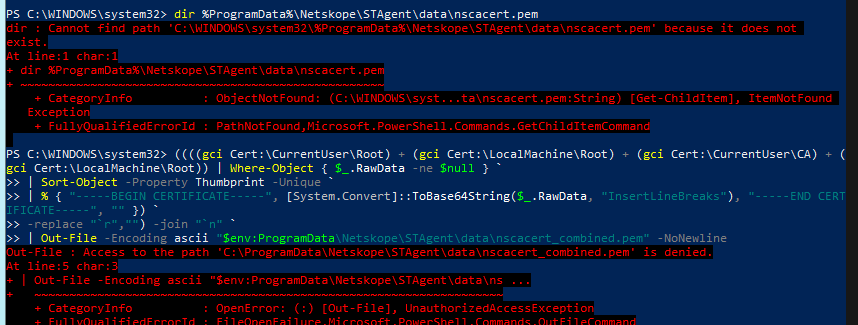
Getting this error when trying to create a CA Bundle in Windows. ‘Protect Client Configuration’ setting is not enabled. Any ideas?


notskope
  • New Member III
  • May 29, 2025

Getting this error when trying to create a CA Bundle in Windows. ‘Protect Client Configuration’ setting is not enabled. Any ideas?

I’m not sure what is causing your error if client file protection is disabled, but you can pretty easily get the CA files from your Netskope console:

<tenant>.goskope.com/ns#/settings?view=certificates&tab=signing or Settings > Manage > Certificates

OR

From your browser, navigate to a site which is being decrypted by Netskope, and view/download the root CA certificate file.


notskope
  • New Member III
  • May 29, 2025

Below is the list of tools/frameworks and instructions on how to make them compatible with Netskope SSL interception:

Tools/Framework Instructions
Python-based apps and scripts Python-based tools that uses requests library can leverage CA bundle referenced by the system variable REQUESTS_CA_BUNDLE .  Create your CA bundle that includes Netskope root CA for your tenant and set environment variable REQUESTS_CA_BUNDLE to point to that file


For anyone else who is using Python and Requests through Netskope:

Python 3.13 and above enforces more strict validation of TLS certificates and you may encounter one of the following errors:

requests.exceptions.SSLError: HTTPSConnectionPool(host='www.google.com', port=443): Max retries exceeded with url: / (Caused by SSLError(SSLCertVerificationError(1, '[SSL: CERTIFICATE_VERIFY_FAILED] certificate verify failed: Missing Authority Key Identifier (_ssl.c:1020)')))

or

requests.exceptions.SSLError: HTTPSConnectionPool(host='google.com', port=443): Max retries exceeded with url: / (Caused by SSLError(SSLCertVerificationError(1, '[SSL: CERTIFICATE_VERIFY_FAILED] certificate verify failed: Basic Constraints of CA cert not marked critical (_ssl.c:1020)')))

due to they way Netskope (improperly) created the root decryption CA/intermediate CA and/or was not including the AKI extension on the spoofed web server certificates.

The easiest workaround I have found is using Python3.12 until Netskope fixes this problem.

This may not affect newer tenants if Netskope has improved the cert generation process in recent years.


Rohit_Bhaskar
Netskope Employee
Forum|alt.badge.img+20
  • Netskope Employee
  • June 18, 2025

Added updates in the Article as mentioned below:


MacOS - Certificate Bundle Script Update:

#!/bin/bash
# This script automates the process of creating a bundled certificate to be used for the requests library in Python
# and sets the correct env var to work seamlessly with Netskope.USERNAME=$(dscl . list /Users | grep -v '^_' | grep -v 'nobody' | grep -v 'daemon'| grep -v 'root')
echo "User is: $USERNAME"
# Check if the certificate file is in the right location.
if [ -f "/tmp/nscacert_combined.pem" ]
then
echo "File exists."
else
echo "File does not exist, creating."
security find-certificate -a -p /System/Library/Keychains/SystemRootCertificates.keychain /Library/Keychains/System.keychain > /tmp/nscacert_combined.pem

fi# Check if zshrc exists.
if [ -f "/Users/$USERNAME/.zshrc" ]
then
echo "Zshrc exists."
RCFILE="/Users/$USERNAME/.zshrc"
# Check if bashrc exists.
elif [ -f "/Users/$USERNAME/.bashrc" ]
then
echo "Bashrc exists."
RCFILE="/Users/$USERNAME/.bashrc"
else
echo "Bashrc nor zshrc does not exist."
fi
echo "RC file is: $RCFILE"# Check if var is set in RC file.
if grep -q "export REQUESTS_CA_BUNDLE='/tmp/nscacert_combined.pem'" $RCFILE
then
echo "Environment Variable is set."
else
echo "Environment Variable not set, setting."
echo "export REQUESTS_CA_BUNDLE='/tmp/nscacert_combined.pem'"
>> $RCFILE
fi

Quick note: Instead of placing the file in the /Library/Application Support/Netskope/STAgent/data folder, store it in a persistent location such as /tmp, or any other stable directory. Then, export the REQUESTS_CA_BUNDLE environment variable to point to the new location of the .pem file. This approach avoids deletion and ensures proper functionality.


  • New Member III
  • July 2, 2025

We are having issues with  Visual Studio which is not working trhough NS 


How can we make VS work through netskope with SSL and try to insert SSL certificate


  • New Member III
  • July 2, 2025

I followed article it is not clear how to setup