

Thoughts on FWaaS Policy
This article assesses some key considerations when constructing a policy for Netskope One Firewall-as-a-Service (FWaaS/Cloud Firewall). FWaaS secures traffic destined for public IP addresses on non-web ports. It should be assumed that the real-time policy table is split into policy groups to aid administrators with the correct placement of their policies. The focus here is the implications of positional placement of policies for Layer 3/4, and Layer 7.
This article assumes that the tenant has been enabled for Service and Destination profiles (the equivalent on a legacy tenant would be Custom Firewall Apps). It also assumes that non-web application firewall is enabled for app detection at L7. Netskope evaluates policies using a top-down approach, hence the first policy that matches the traffic flow criteria will apply.
Key Points
- The following are some of the policy objects that can act on traffic processed by firewall and therefore potentially change behaviour of non-web traffic flows i.e.
- Service profiles
- Destination profiles
- FWaaS Apps (non-web eg. SSH/RDP/FTP etc)
- Hybrid Apps (both web and non-web eg. Teams/Zoom etc)
- Any Traffic (specified directly in policy)
- DLP Profiles (applies to FTP only at time of writing)
- Threat Protection Profiles (applies to FTP only at time of writing)
- To check for a match against a policy using FWaaS or hybrid apps, up to 6x TCP packets (excluding TCP handshake), or 6x UDP packets, must first be allowed end to end to allow the Deep Packet Inspection (DPI) engine to attempt a pattern match against a traffic flow. The pattern match does not need to consider (non-web) port number hence it is port number agnostic. With the hybrid apps it is the non-web portion (non-TCP 80/443) that is subject to DPI.
- A policy blocking a Service object will block at packet 1, unless a policy exists above it that refers to a FWaaS or hybrid app, in which case, it would block after approximately the 6th packet (assuming DPI engine found no match) since that would initially force DPI to look for a matching pattern. If you want to block/allow an L3/4 port immediately on packet 1, keep it above ANY L7 policies.
- Placement of Service profiles containing TCP 80/443 high up in the table would cause the avoidance of any CASB policies beneath. Not recommended.
- L3/4 and L7 FWaaS apps should not be mixed together into the same policy.
- FWaaS will steer all TCP/UDP/ICMP (Windows only) ports aside from DNS (TCP/UDP 53 and UDP 5353 not steered unless DNS steering is enabled).
- Other critical policy sections not discussed here will help form a complete policy design. Top/Middle/Bottom references should therefore not be considered absolute.
Should I use Default Action Block or Allow for Non-Web Traffic?
Traditionally all firewall deployments start with a default block policy, and it remains aligned with a Zero Trust Network Access (ZTNA) approach. This is the default configuration in a Netskope tenant when it is first commissioned. This approach should only be overridden with a documented business justification, and even in that scenario, a default block should still be the end-goal for all production environments.
With a default block, there is more focus on creating FWaaS Allow policies. With a default allow, there is more focus on creating FWaaS Block policies. The migration from one approach to the other when there are already many users deployed in production can be technically challenging and impactful. It can also be difficult for companies to obtain the required business change approval.
Taking advantage of the default (block) configuration at the start of a deployment when there are only a few test/pilot users could be considered as a better approach.
When to use 1st packet block?
This is typically needed when trying to block the operation of protocols that are short lived and can complete a transaction in less than 6x packets. If these are not blocked at packet 1, they could still operate successfully.
Examples:
- DNS
- NTP
- OCSP checks
- QUIC/HTTP3 probes
- TCP connection checks
There are other examples of applications that can perform some initial tasks in under 6x packets and at first appear to users like they are not blocked. An example may include RDP prompting for user credentials, before subsequently getting blocked. If this was a concern, it could instead be blocked at packet 1 using the approach discussed.
What about policy ordering?
Discussion (Example 1)
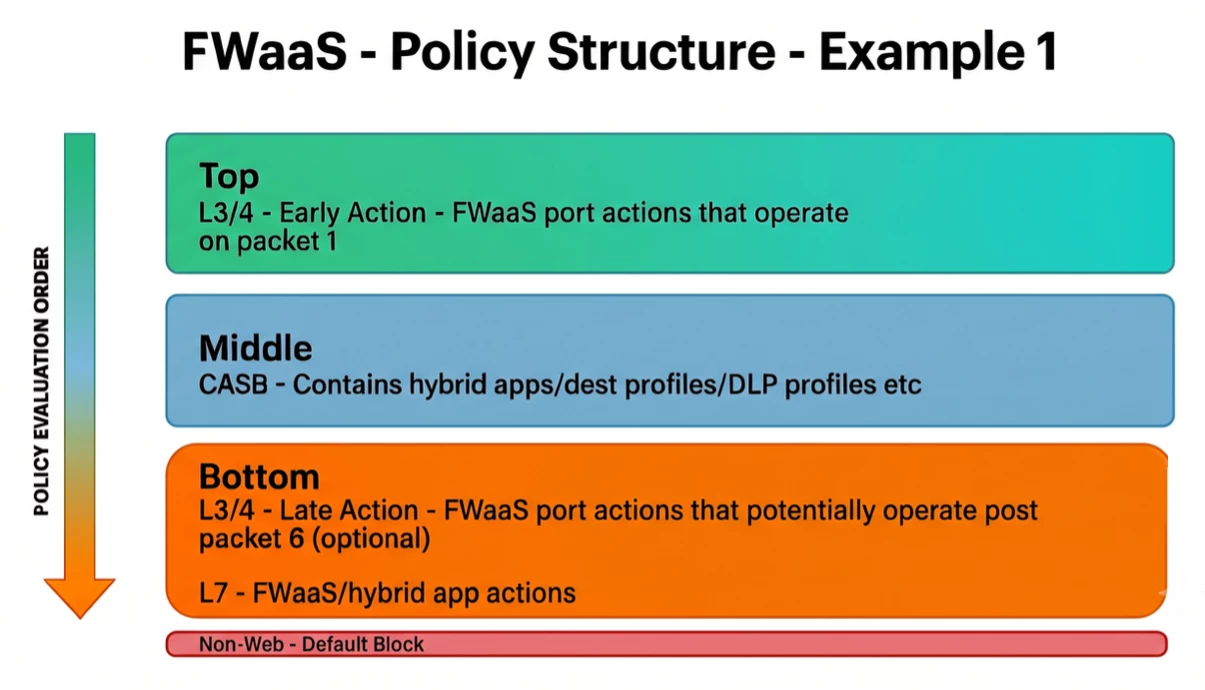
In this example scenario, during the policy build there is at least one protocol identified that we wish to block at packet 1. (See short-lived protocol reference above). Therefore, we create that L3/4 policy high in the table, above all other granular CASB policies that may interact with non-web traffic, and trigger DPI. This example structure could represent a low maintenance approach. Most FWaaS policy would be built out at the bottom.
L3/4 port blocks and allows that can be applied post packet 6 can go towards the end of the policy (niche use cases), below all other policies that may interact with non-web traffic (except for the L7 – FWaaS /hybrid app policies). It is possible that these policies could still operate on packet 1, but that would assume there are no relevant FWaaS /hybrid apps impacting the same given traffic flow in the middle section. If they did operate on packet 1 at time of creation, consider that future policy changes in the middle section may change that behaviour, and it may not be immediately obvious to an administrator making the change that this has happened. To always ensure action is taken on packet 1 you should place them at the top.
Use-Case Examples
1 - Quic to go into the Top section as an early action L3/4 block. This would prevent UDP 443 at the earliest opportunity. It is possible for some apps to perform DNS lookups using Quic, and this would represent a short-lived application to block.
2 - Microsoft Teams into the middle section, to perform corporate instance detection, or DLP on post activity for sensitive data loss prevention. This type of policy will act only on the web component and has zero bearing on the non-web packets.
3 – Late action L3/4 blocks/allows could include policies that take an action on a Service port whereby a packet 1 block is not critical, or if it is not certain if some CASB or DLP policies might rely on that action not taking place early. In this sense a port or a port range could be quite broad and could be best avoided with an early action.
4 - Microsoft Teams to go into L7 section for non-web traffic app allow against the hybrid app.
Discussion (Example 2)
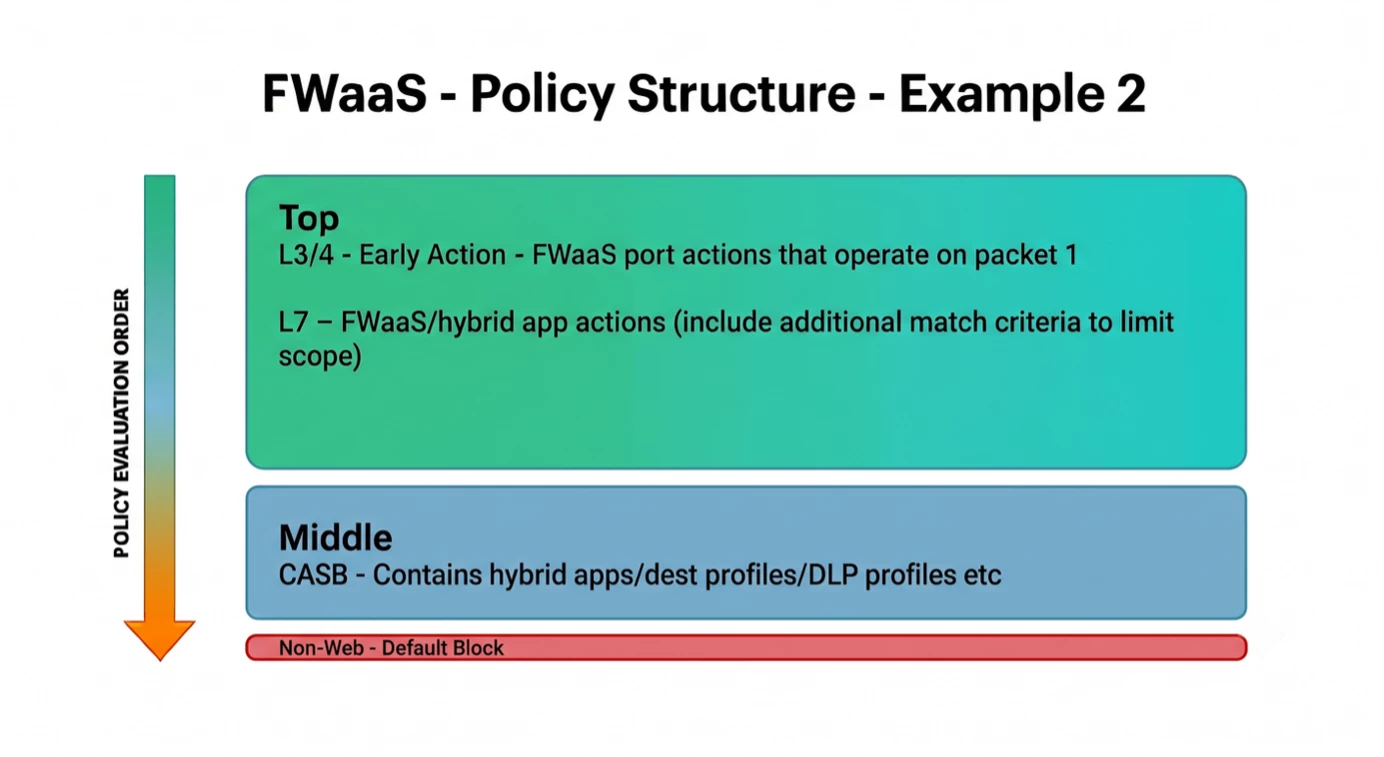
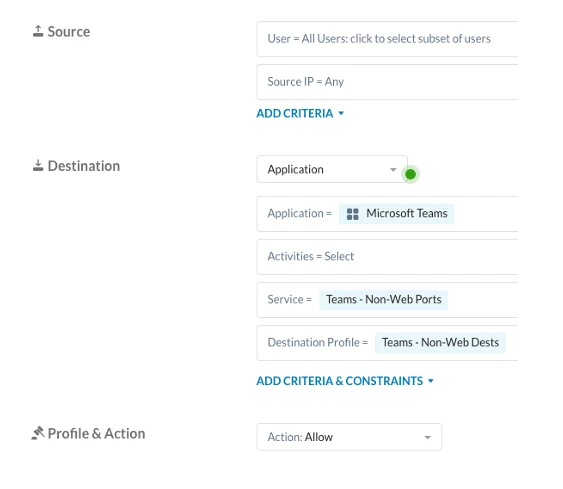
In this example, we have the L7 policies defined in the Top section, right below L3/4. The FWaaS/hybrid apps at this level could mean that further planned CASB actions are skipped for the web traffic on hybrid apps. To avoid that scenario in this policy structure, you would need to create L7 policies which also include Destination/Service Profile match criteria. This will ensure that ONLY the non-web port traffic is impacted by the defined FWaaS L7 policy (example below).
Use-Case Examples
1 - NTP to go into the Top section as an early L3/4 block (eg. Ensure internal corporate NTP server usage by blocking public facing NTP. FWaaS would not block the RFC1918 destined traffic, it would be bypassed by default).
2 – Microsoft Teams to go into the Top L7 section to allow non-web components (include Dest/Service profiles to reduce scope to only apply to non-web traffic).
3 – Microsoft Teams into the middle section, to perform DLP on post activity for sensitive data loss prevention.
Next Steps
To learn more about Netskope Cloud Firewall and how to configure it, start with our documentation here: https://docs.netskope.com/en/netskope-help/data-security/netskope-cloud-firewall



