




Hello Everyone,
I have a query regarding Netskope with Sensitivity Labels for Email DLP.
We have integrated Netskope with the "Sensitivity Label" feature and successfully published all labels into Netskope. Using this integration, our Endpoint DLP, Cloud and Web DLP label‑based policies are working as expected.
However, for SMTP Email Proxy, labeled attachments (Secret, Top Secret, Restricted) are getting bypassed. We tested multiple approaches:
- GUID‑based method: Extracted GUIDs from the MIP Compliance Portal and created custom regex entities (e.g.,
- MSIP_Label_<GUID>_Name
- These did not trigger in SMTP DLP.
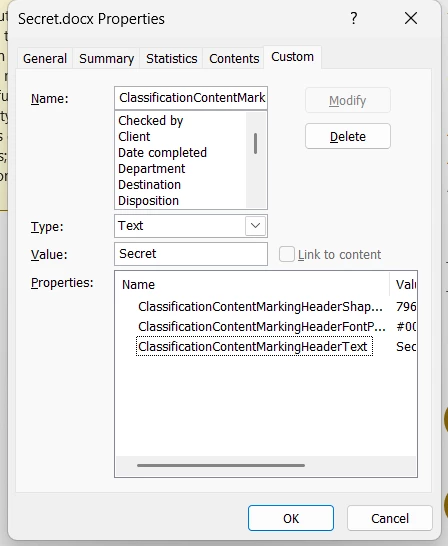
- Metadata extraction workaround: For Word files, we extracted metadata via File → Info → Properties → Advanced Properties → Custom and used regex (
- ClassificationContentMarkingHeaderText.*Restricted
- This works only for Word attachments. Excel do not expose metadata in the Custom tab.its empty.
- Service account permissions: Assigned EXPORT role to the service account used for Sensitivity Label integration — no impact.
- Documentation review: The Netskope documentation states that decrypting and reading labels from email attachments is not supported under the Sensitivity Label integration.
Document Reference Link: https://docs.netskope.com/en/microsoft-purview-information-protection-and-netskope-drm#email---eml--file-scanning-support
Screen Shot of Doc:
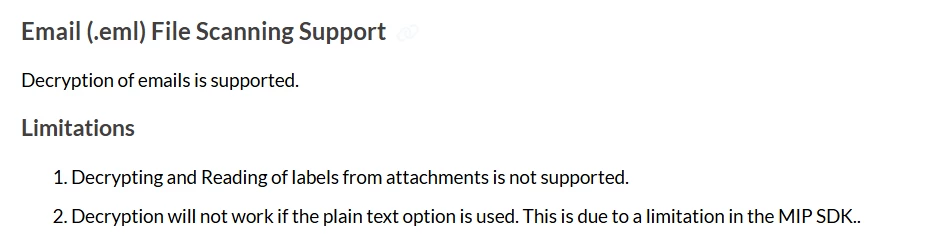
Based on this, could you please confirm whether "Sensitivity Label" Feature Integration can support SMTP Email DLP, or if we will require the Microsoft Purview Integration feature/license to enforce label‑based DLP for email attachments?
WORKAROUND
Current Email DLP Setup
-
Created DLP Entities, Rules, and Profiles for all labels: Public, Restricted, Secret, Top Secret.
-
For Word documents, we extracted metadata via File → Info → Properties → Advanced Properties → Custom tab. And created a Regex Entity.
-
Example:
ClassificationContentMarkingHeaderText.*Restricted
-
Used these regex entities in SMTP DLP policies.
-
Real‑time protection policy adds headers for enforcement:
X-Netskope-Action: Block
-
This works fine for Word attachments (Emails) — detection and enforcement trigger correctly.
What I’ve Already Tested
-
GUID‑based approach: Extracted GUIDs from the MIP portal and created a custom regex Entity for e.g.:
MSIP_Label_4119f1cb-5a0c-41ad-b396-aec13f2b846d_Name→ This did not trigger in SMTP DLP, even though GUIDs are valid in Purview.
-
Regex on Word metadata: Works consistently (
ClassificationContentMarkingHeaderText). -
Excel & PowerPoint: Custom tab is empty, so metadata cannot be extracted the same way as Word. I’ve already inspected the OpenXML package (
docProps,customXml) but haven’t found a reliable property string to base regex on.
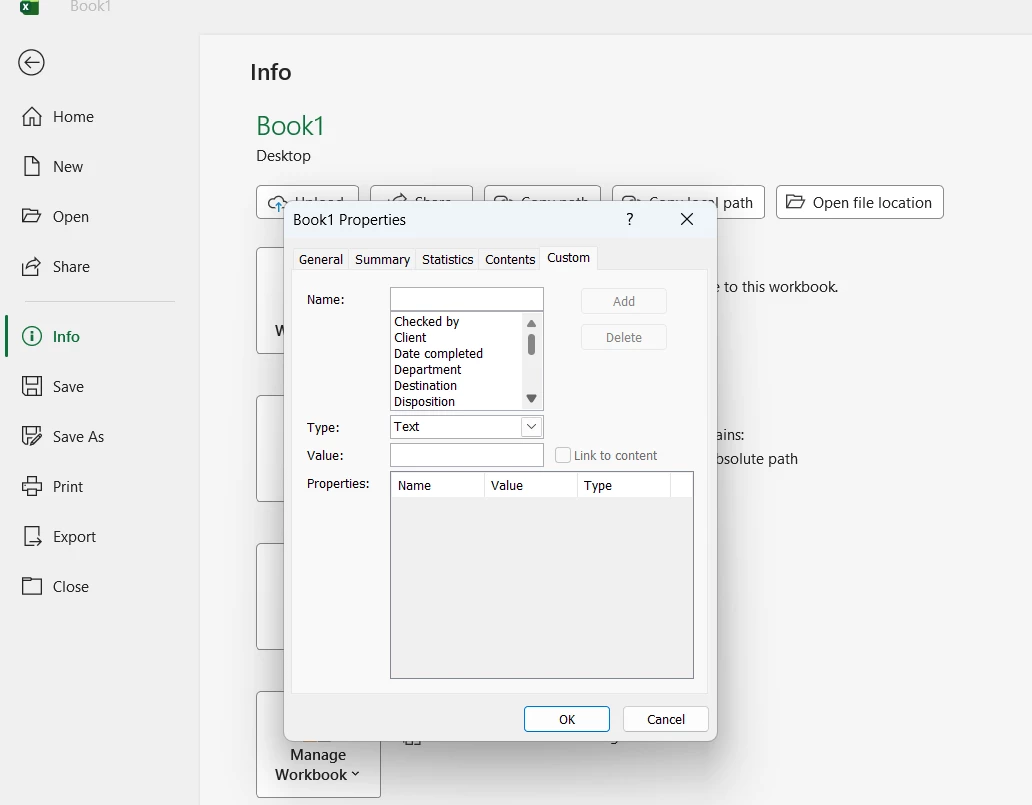
Excel & PowerPoint challenge
-
For these file types, the Custom tab is empty and I cannot extract metadata values like I can in Word.
-
How can we build regex entities for Excel and PowerPoint labels?
-
Is there a recommended method to extract classification metadata for these file types so we can enforce SMTP DLP consistently?
What I’ve Done So Far
-
Verified that Cloud/Web traffic, Endpoint DLP label‑based DLP works fine.
-
For Email DLP, Word and Powerpoint files are covered using regex on
ClassificationContentMarkingHeaderText. -
Tried GUID‑based regex but it bypasses.
-
Real‑time outbound policy is configured with header injection for enforcement.
Question:
Based on this, Just need Confirmation whether "Sensitivity Label" Feature Integration can support SMTP Email DLP, or if we will require the Microsoft Purview Integration feature/license to enforce label‑based DLP for email attachments?



