



Many of our clients have been in contact with Netskope with regards to the news of the latest Salesforce breaches involving Gainsight 3rd party plugin, what should be the main takeaways to our users regarding this breach in particular and how to protect against similar attacks.
For the latest and most accurate news on this, the most trustworthy and relevant news sources should be Gainsight incident advisory on their community site and the related Salesforce security advisory. Whilst the news are still very fresh and the investigation is ongoing at the time of writing this, we have a few interesting intelligence pieces available which are worth of note at this point:
This hack is related to the earlier Salesloft drift attack
- The tactics used by the attackers are similar to what was witnessed during the Salesloft Drift breach in the summer of 2025. According to bleepingcomputer.com, the same threat actor behind the Drift hacks has claimed responsibility for the hack. Netskope’s analysis and advice from those events remain relevant.
- Gainsight and Salesforce are taking responsibility and handling the response to this hack. They have been in contact with parties who they have identified as compromised.
- The impact of the attack seems to be more limited than the last time. This suggests Salesforce has put more proactive controls in place such as anomaly detection to defend against this type of breaches since.
Customers should vet and harden the 3rd party integrations they rely on
- With regards to supply chain security in general and 3rd party app monitoring, our advice is in line with the Mandiant researchers currently investigating this breach. Vet through your 3rd party integrations regularly, harden controls where you can.
- It should not be reasonable to expect a major vendor integration with a good reputation such as Gainsight to cause most users concern in their integration vetting process. Gainsight and Salesforce are major companies with extensive security resources to protect their deployments and customer trust. With such high profile apps, it’s fair to assume the vendors have the primary responsibility for protecting your trust and ensuring their integrations are built to fail safely.
- Ensuring even the best-protected apps are configured and used safely still remains your company’s responsibility.
- You can double-check your integrations are configured according to vendor guidelines. Document any discrepancies you find.
- Lean towards stricter restrictions than the baseline in your deployment when possible. E.g. disable a permission from a service account if it’s asked by an integration feature you are not using.
- Keep your vendors accountable for the privileges and trust you entitle them for, ensure they explain and document reasons for every permission they require and support integration hardening options available within the platforms.
- Rather than worrying about headline-breaking breaches of major platforms such as Gainsight or Salesloft, it’s a good idea for the platform user to focus their 3rd party app vetting process on less-known and -monitored integrations, such as unknown or custom plugins only deployed in your environment.
- Salesforce incident monitoring will be able to catch misuse of large scale such as the Salesloft or Gainsight supply chain breaches. But a custom plugin deployed by an intern of your company 3 years ago which leaked its access credentials will stay under their radar. You need to maintain the security hygiene of those integrations yourself.
Restricting 3rd party integration access with IP address allowlisting remains an effective defense
- Since the attackers were using VPN’s for exfiltration, restricting IP Addresses used by the integrations has proven to be an effective countermeasure against these attacks just like they were during the Salesloft attacks.
- The IP Address restrictions for Salesforce integrations are done on the profile level. You can use the “Login IP Ranges” -setting for the Salesforce Profile which is attached to the user who has onboarded the 3rd party application to ensure the integration can only be used from trusted IP addresses.
- Netskope SSPM has visibility to the profile objects and can alert you for any profiles capable of using API’s without IP Address range restrictions set up. For example, you can use the following NGL in the Inventory Search to hunt for user-created API-capable user profiles without IP Login Restrictions configured to them:
Salesforce Profile should-have Permissions with-any-element [
( PermissionName = "PermissionsApiEnabled" and
isEnabled = true )
] and loginIpRanges not-exists
and custom = true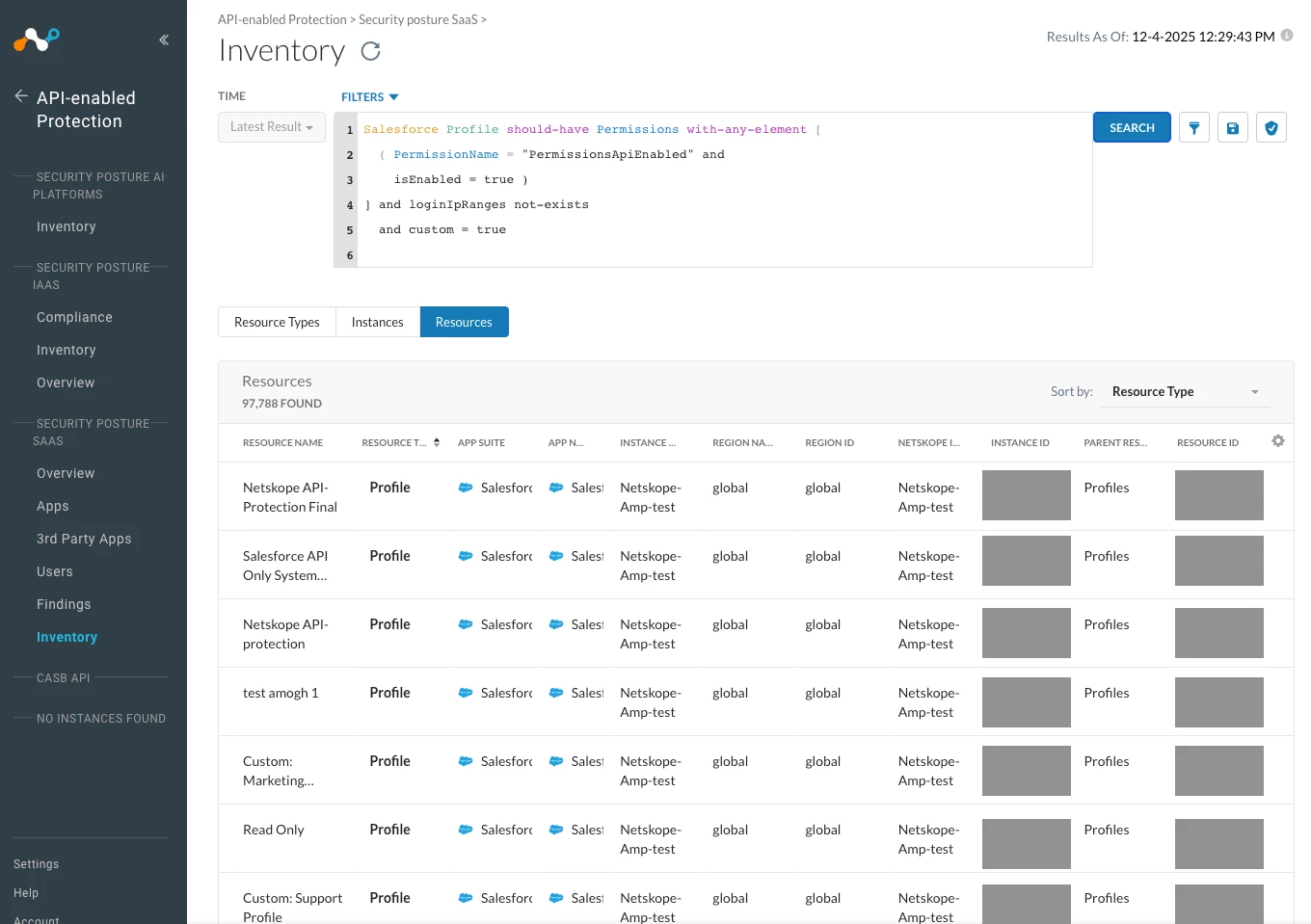
- As always, you can customize and refine the queries to your own needs. For another example for vetting the login IP Ranges, check out the Salesforce Rule template called ‘[Template] Privileged profiles login access lack IP range restrictions’ - where we show an example on implementing a blocklist for profiles where IP Range restrictions should be put in place.
- Netskope SSPM has over 800 similar built-in detections and allows you to build more workflows for this and other types of vetting and anomaly alerting. And we are constantly expanding. Netskope SSPM with its flexibility and underlying graph-model is well suited to help you audit for this type of weaknesses in your configurations.



