


The AgentSkope Marketplace announcement covered what the Marketplace does, and a shorter companion post walks the arithmetic. This is the complete version, for anyone who wants the mechanics rather than the summary.
The same point came back from customer after customer. We want to consume everything you are building, they told us, but our procurement can't keep pace with your AI innovation. The constraint was never appetite. It was the purchasing motion itself.
Three roles share the work. A Decision Maker estimates, purchases and renews credits. An Allocator distributes what was purchased and adjusts those allocations over time. A Practitioner runs the agents day to day. I'll follow two agents through all of it.
The model
You make one commitment, held as a pool of capacity credits. A credit is the funding unit. Every agent converts credits into its own unit of work at its own published rate, so an allocation sets how much work that agent can do in a calendar month.
Capacity is monthly. Every agent starts the first of the month with its full allocated share, for the length of the term.
The DLP AISecOps Agent meters investigations and charges 7.5 credits for each one. The Insider Threat AISecOps Agent meters users on a watchlist and charges 187.5 credits per user. The rate tells you the shape of the work the agent does.
Credit rates in this post are examples. Actual rates vary by agent and may differ in the product, so check the catalog for current rates.
What's in the catalog, and what each state costs
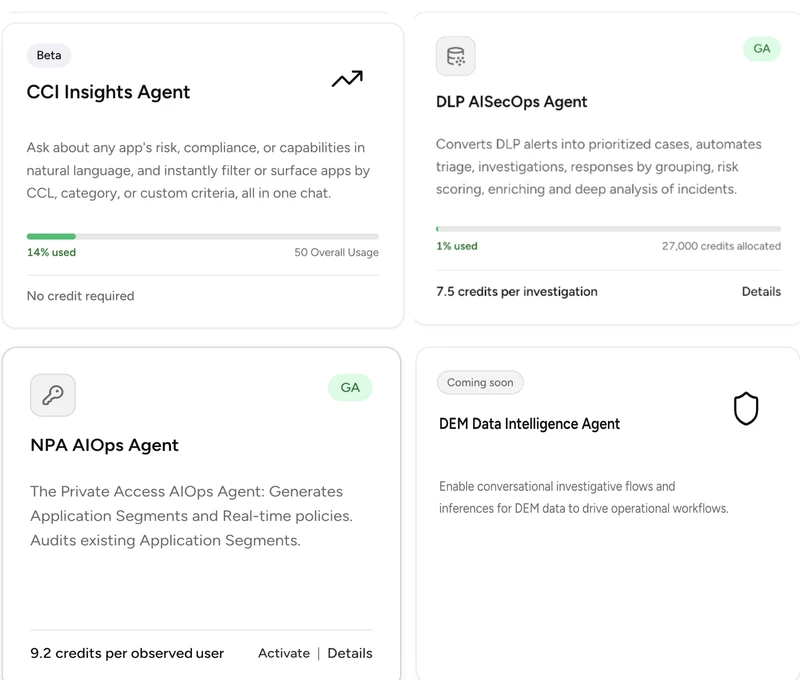
Each tile carries the agent's rate, its lifecycle stage, and how much of its allocation is used.
Screenshots are illustrations from a demo tenant, captured at different times, so figures vary between images.
The catalog filters by family and by status. Each tile carries the agent's description, its rate, its lifecycle stage, and how much of its allocation is used, so maturity and cost sit together before you commit to anything.
Four states show up, and they have different commercial consequences.
A beta agent draws no credits. CCI Insights reads No credit required, so I can put it in front of my team and form an opinion without touching the pool.
A generally available agent that is activated behaves as you'd expect. It holds an allocation and reports usage against it.
A generally available agent can also sit priced but dormant. The NPA AIOps agent publishes its rate and offers an Activate action, with nothing allocated to it yet, so I can size a capability I haven't adopted without a meeting.
A coming soon agent publishes no rate at all.
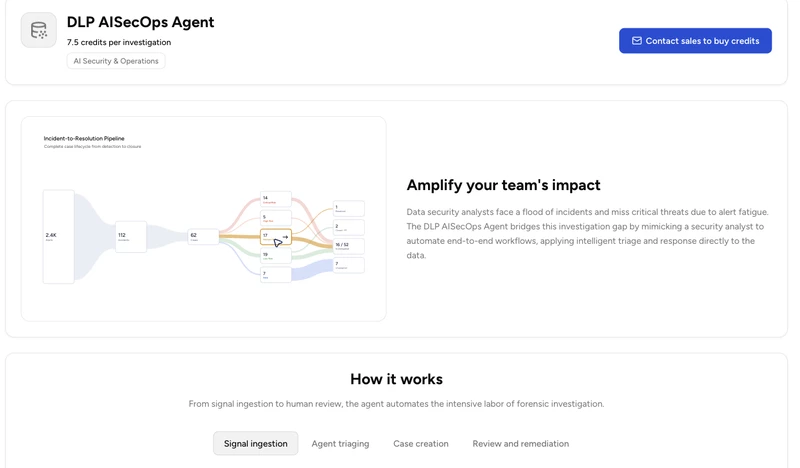
Agent detail: the pipeline, and the stages behind it.
Opening an agent shows what it does. The DLP AISecOps Agent is tagged AI Security & Operations, and its Incident-to-Resolution Pipeline shows the case lifecycle as a flow, from alerts narrowing to incidents, then to cases, then out to resolution states. Underneath, the agent breaks into four stages you can step through, covering signal ingestion, triage, case creation, and review and remediation.
Sizing a portfolio
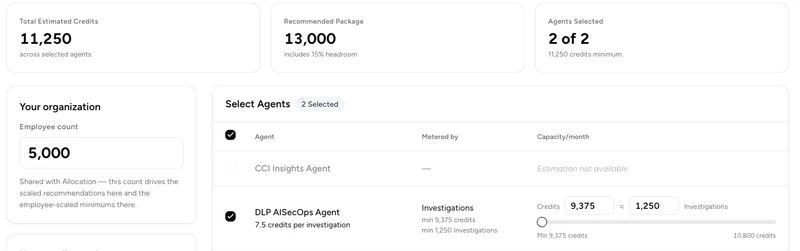
Estimation totals the portfolio, then recommends a package with headroom on top.
An employee count, 5,000 here, drives the starting recommendation for an organization of that size. What it gives me is the translation from outcomes to credits, and it works in both directions. Enter 1,250 investigations and it returns 9,375 credits, while 10 watched users comes back as 1,875, so the portfolio totals 11,250 credits a month.
The recommended package then adds 15% and rounds up, which turns 11,250 into 13,000. That's the headroom I draw on later, when one agent runs hotter than I sized it for, or when I want to adopt a new agent right away without opening a procurement cycle.
Two agents read Estimation not available, and for different reasons. CCI Insights needs no credits, and the NPA AIOps agent isn't activated.
The employee count carries through to Allocation, so the sizing I do here isn't thrown away at purchase.
You should estimate against your own volumes rather than the defaults. If you know what your team ran last quarter, enter it.
Buying it
Purchasing is sales-assisted. Estimation ends in a quote request for a specific monthly figure, so the number I built becomes the baseline for one conversation with my Netskope account representative, rather than one conversation for each agent.
What arrives is a monthly capacity for the length of the term. Here I'm illustrating a purchase of 50,000 credits a month, and the screens that follow show that commitment, valid through December 31, 2026.
Dividing the pool
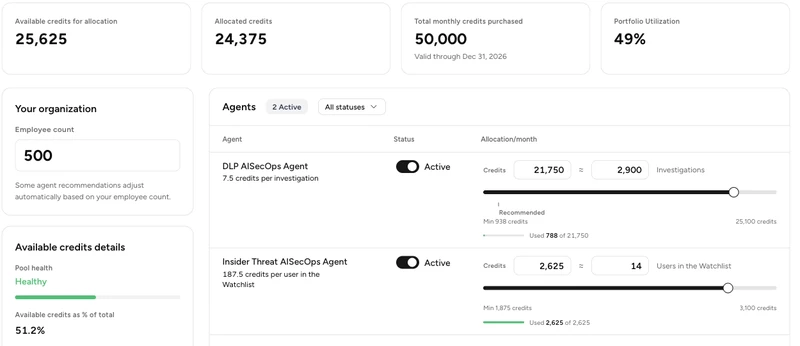
One pool, divided across agents, with buffer deliberately left over.
Four figures sit at the top of Allocation. Against a commitment of 50,000 credits a month, 24,375 is allocated, which leaves 25,625 available and puts portfolio utilization at 49%.
Alongside those, a pool health reading shows how much buffer is left, described as capacity for unexpected spikes. In this tenant it reads healthy, with available credits at 51.2% of the total. The part I leave unassigned is what absorbs a surge, and what funds a new agent when I adopt one.
DLP AISecOps takes 21,750 credits, which the product reads back as roughly 2,900 investigations. Insider Threat takes 2,625, or 14 watched users. The two figures move together, so I can allocate in investigations and let the product convert, or work in credits and watch the outcome figure follow.
Two comparisons that share a name
Both get called utilization, and they answer different questions.
Allocated against purchased asks whether I've distributed the pool. It reads 49% here, and it's a planning number.
Usage against allocation asks whether a given agent has enough to work with. That's an operational number, and it lives on a different screen.
These are capacity guidelines, and I can come back and change them at any time.
Running the month
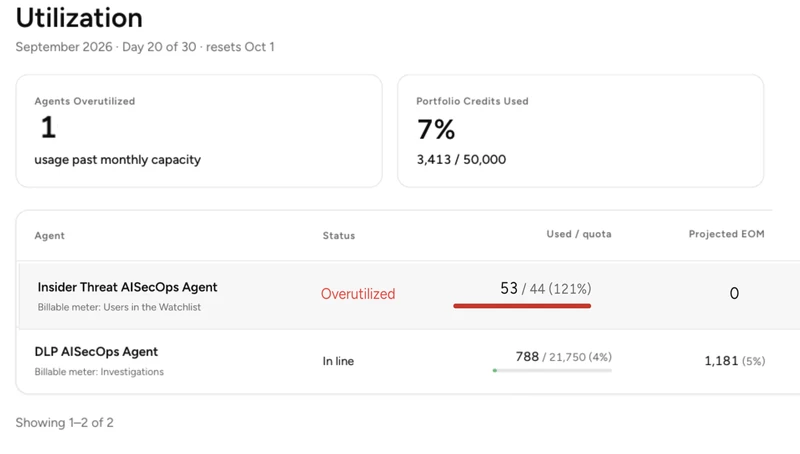
The accounting period, portfolio usage, and each agent's status against its allocation.
The header states the accounting period, which reads September 2026, day 20 of 30, resetting on October 1. Portfolio credits used reads 7%, or 3,413 of 50,000, with 10 days left in the month. The days remaining sit next to the projection, so the projection has a denominator.
Each agent reports usage against its allocation, a projected end of month, a thirty-day trend, and a change against last month.
DLP AISecOps has used 788 of its 21,750 and is projected to reach 1,181 by month end, which is 4% of what it holds. It's also up 98.1% on last month. Growing fast and sitting comfortably inside an allocation aren't contradictory, and a single portfolio percentage hides both at once.
An agent that has used everything allocated to it is flagged as overutilized. It keeps working while headroom is available, which is what the unallocated part of the pool is there for.
There's no separate alerting console to learn. Status text, a red trend figure and a filling usage bar carry the signal on the screen the Allocator already reads.
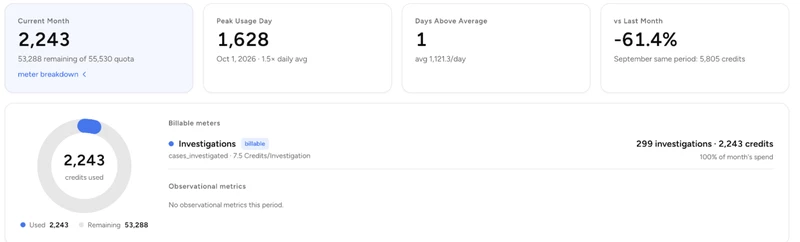
Per-agent detail: usage, peak day, days above average, and the ninety-day shape.
A Practitioner running one agent works from its own page, which reports the month in more detail. For DLP AISecOps that's 2,243 credits used, a peak day of 1,628 at 1.5 times the daily average, one day above average against a mean of 1,121.3 a day, and a change of 61.4% below the same period in September.
The billable meter breaks out underneath, showing 299 investigations at 7.5 credits each, which accounts for the whole of the month's usage. The ninety-day chart plots daily usage against a pace line and a seven-day rolling average, and labels the spike.
Practitioners focus on whether they have enough capacity to finish the month, and the telemetry they generate is what sizes the next commitment.
Moving capacity mid-month

Changes stage rather than apply, so nothing is committed until you save.
Consider a month where one agent runs at its limit with ten days still to go, while another sits lightly used. Under a per-capability purchase that isn't fixable, because the unused capacity is attached to the product that bought it, the money is already committed, and there isn't enough month left to raise a purchase order.
With a pooled commitment I fix it in Allocation, taking capacity from the quiet agent, or from what's unallocated, and giving it to the one at its limit.
Changes stage before they apply. The header counts what's pending, both figures move together as I work, and I either save or cancel.
While changes are staged, usage bars keep reading against the committed figure rather than the pending one. An agent can show its usage against 3,000 while the input above reads 3,011, so what's live and what's proposed are visible at the same time.
Only unused capacity moves, so taking credits back from DLP AISecOps doesn't undo the 788 it has already worked through. Saving takes effect right away, and the change carries into later months as the plan.
When the pool itself is too small
Adopting a new agent normally draws on buffer I already hold. Reallocation needs enough headroom to pull from, and when the credits are all allocated and every agent is near its ceiling, the pool itself has to grow.
That means a conversation with the account team. One conversation, about the pool, rather than one for every agent.
Renewal
Across a term the utilization record becomes a demand curve, showing which agents are growing and how fast. Adoption usually climbs, and this is where I see by how much and plan for it.
An agent that nearly doubled month over month while using 4% of its share is one to size up, and that number only means something next to the allocation it sat inside. When finance asks what to commit to next year, the answer has numbers behind it.
Who does what
The three roles map onto the stages, and the permissions follow the decisions.
The Decision Maker owns the commitment, estimating, purchasing, topping up and renewing. They work in Estimation and read pool-level totals.
The Allocator owns the split, dividing the pool and adjusting it when priorities move. They work in Allocation and Utilization.
The Practitioner owns none of the commercial decisions. They run the agents and read the capacity left for the month.
All three work from the same utilization data, and the inputs travel upward. Practitioners see what their agents are using and tell the Allocator what they need. The Allocator sees the whole pool and tells the Decision Maker what the next commitment should carry.
Getting started
AgentSkope Marketplace is live. Open the Netskope Admin Console, go to the Marketplace, and run Estimation against your own volumes. Browsing and estimating commit nothing.
AgentSkope and the Marketplace are available across all management planes, with the current exception of KSA and the Fed and PBMM compliance environments.



