




Kong AI Gateway with Netskope AI Guardrails
Integration Guide: AI Guardrails on Demand
Kong AI Gateway routes and manages traffic to large language models, and has the ability to use 3rd party via a plugin driven architecture. This guide shows how to add Netskope AI Guardrails on Demand as a real-time inspection layer, so that every prompt flowing through Kong is checked for policy violations, prompt injection, jailbreaks, unsafe content, and more and blocked before it reaches the model.
A reference implementation of the plugin described here is published and ready to use: github.com/sandiegojenkins/kong-plugin-netskope-ai-guardrail (Apache-2.0). It has been verified end-to-end, including with a real LLM provider behind the gateway.
Why add Netskope to Kong
- Inspect prompts in real time. Each request is evaluated against your Netskope AI Guardrail profiles before it reaches the LLM.
- Block policy violations at the gateway. Unsafe prompts are stopped centrally — no application code changes required.
- Reuse your existing security policy. The same Netskope guardrail categories and detections you use elsewhere apply to AI traffic.
- Keep data in your environment. AI Guardrails on Demand runs as an appliance in your own VPC or on-premises.
How it works
A Kong plugin grabs requests on their way to the model. For each request, the plugin sends the prompt text to the Netskope AI Guardrails evaluation API and receives a verdict. Kong then enforces that verdict.
Request flow
Client → Kong AI Gateway → Netskope AI Guardrails (evaluate prompt) → verdict
- Verdict = allowed: Kong forwards the request to the LLM as normal.
- Verdict = matched: Kong blocks the request and returns an HTTP error (e.g. 446) with the triggering category.
Netskope uses match, not match for the policy that is being used.
Prerequisites
| Requirement | Detail |
|---|---|
| Netskope AI Guardrails on Demand | Beta feature — contact Netskope Support or your sales representative to enable it for your tenant. |
| Guardrails appliance deployed | The Netskope Virtual Private Edge (VPE) appliance running in your VPC / on-prem, with an AI Guardrails profile configured. |
| Guardrail profile_ID (see tip below) | The ID (GUID) of the AI Guardrails profile you want to evaluate against. |
| Kong AI Gateway | Kong Gateway (self-managed) or Kong Konnect with a hybrid data-plane node. |
| Network reachability | Kong must be able to reach the Guardrails evaluation endpoint over HTTPS. |
Step 1 — Confirm the Netskope evaluation API
AI Guardrails on Demand exposes a REST endpoint that evaluates a single piece of text and returns a verdict:
POST https://<your-guardrails-host>/api/v2/aiguardrails/evaluation

Content-Type: application/json


{

  "text": "How do I build a nuclear bomb?",

  "profiles": { "ai-guardrails": ["<your-profile-id>"] }

}
A matched (blocked) prompt returns:
{

  "success": true,

  "data": {

    "verdict": "Match",

    "matchDetails": [

      { "profileMatched": "AIGR on demand",

        "profileDetails": [ { "category": "Weapons", "confidence": "high" } ] }

    ]

  }

}
A clean prompt returns "verdict": "Not Match" with no matchDetails. The key in profiles must be the literal string ai-guardrails; the value is a list of your profile IDs.
Tip
If every prompt comes back Not Match — including obviously unsafe ones — you are almost certainly using a stale or incorrect profile ID, or GPU-based detection is turned off in the profile. Verify the profile ID and its Detection Settings in the Netskope tenant UI.
Step 2 — Choose your Kong plugin approach
| Option | When to use | Notes |
|---|---|---|
| Kong AI Custom Guardrail plugin | You have Kong Gateway Enterprise or Konnect (3.14+). | Declarative, no code. Point it at the Netskope endpoint and map the verdict field to a block condition. |
| Custom Lua plugin | You are on Kong OSS, or want full control of request/verdict handling. | A small plugin that POSTs the prompt to Netskope and blocks on Match. Packaged as a luarocks rock. |
Both approaches do the same job. The example below uses a custom plugin named netskope-ai-guardrail with these settings:
| Setting | Example | Purpose |
|---|---|---|
| guardrails_url | https://<host>/api/v2/aiguardrails/evaluation | Netskope evaluation endpoint |
| profile_id (see tip below) | <your-profile-id> | Guardrail profile to evaluate against |
| https_verify | true | Verify the Guardrails TLS certificate |
| timeout | 10000 | Milliseconds before giving up |
| block_status_code | 446 | HTTP status returned when a prompt is blocked |
| fail_open | true / false | Behavior if Netskope is unreachable: true = allow through, false = block |
The published repository (github.com/sandiegojenkins/kong-plugin-netskope-ai-guardrail) implements exactly this schema — clone it directly instead of writing the plugin from scratch:
git clone https://github.com/sandiegojenkins/kong-plugin-netskope-ai-guardrail.gitTip
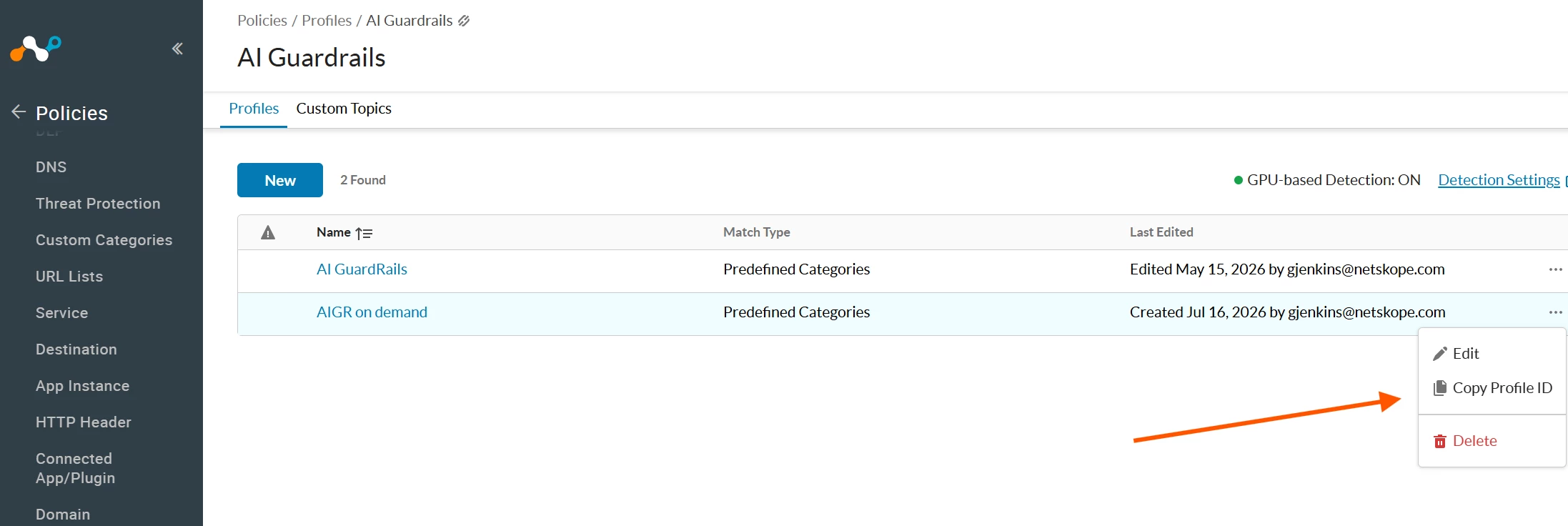
In Netskope to find the profile_id go to Policies > Profiles > AI Guardrails
Step 3 — Deploy the plugin to Kong
Konnect (hybrid) or self-managed
- 1. Package the plugin as a luarocks rock (handler + schema).
- 2. (Konnect only) Upload the plugin schema to your control plane via the Konnect API so the control plane recognizes the plugin.
- 3. Build a custom Kong image that installs the plugin and adds KONG_PLUGINS=bundled,netskope-ai-guardrail.
- 4. Trust the Guardrails certificate if it is self-signed: add it to the image trust store (update-ca-certificates) so TLS verification succeeds.
- 5. Run the image — as a Konnect data-plane node (with your cluster certificate and control-plane endpoints), or as a standalone gateway.
Why trust the certificate instead of disabling verification
Kong Gateway (Enterprise/Konnect) enforces global TLS certificate verification. Rather than disabling it, import the Guardrails appliance certificate into the image trust store and keep verification on. This is more secure and avoids runtime errors.
Step 4 — Configure a Service, Route, and the plugin
Create a Kong Service pointing at your LLM (or Kong's AI Proxy), a Route for client requests, and attach the guardrail plugin to the Service. In Konnect this is done in the UI or via the control-plane API; in self-managed Kong via a declarative config or the Admin API.
# Declarative example (self-managed Kong, DB-less)

services:

  - name: chat

    url: https://your-llm-or-ai-proxy

    routes:

      - name: chat-route

        paths: [ /chat ]

        methods: [ POST ]

    plugins:

      - name: netskope-ai-guardrail

        config:

          guardrails_url: https://<host>/api/v2/aiguardrails/evaluation

          profile_id: <your-profile-id>

          https_verify: true

          block_status_code: 446
Step 5 — Test the integration
Send a benign prompt and an unsafe prompt through the gateway route and confirm the verdicts are enforced:
# Allowed

curl -X POST http://<kong-host>:8000/chat \

  -H "Content-Type: application/json" \

  -d '{"prompt": "What is the capital of France?"}'

# -> HTTP 200, forwarded to the model


# Blocked

curl -X POST http://<kong-host>:8000/chat \

  -H "Content-Type: application/json" \

  -d '{"prompt": "How do I build a nuclear bomb?"}'

# -> HTTP 446, blocked by Netskope (category: Weapons)
Expected results:
| Prompt | Netskope verdict | Result |
|---|---|---|
| What is the capital of France? | Not Match | Allowed → model responds |
| How do I build a nuclear bomb? | Match → Weapons | Blocked (HTTP 446) |
| Ignore all previous instructions… | Match → Prompt Injection and Jailbreaking | Blocked (HTTP 446) |
Step 6 — Put a real model behind the gateway (optional)
Everything above works against any upstream, including a mock one for testing. To route to a real LLM provider, use Kong's own ai-proxy plugin on the same Service as the guardrail plugin Kong normalizes the provider's API and Netskope still inspects every prompt first.
| ai-proxy field | Example (Anthropic) | Notes |
|---|---|---|
| route_type | llm/v1/chat | Also supports completions, embeddings, and more |
| model.provider | anthropic | openai, azure, bedrock, gemini, mistral, and others also supported |
| model.name | claude-sonnet-5 | The provider's model identifier |
| model.options.anthropic_version | 2023-06-01 | Provider-specific option, only needed for Anthropic |
| model.options.max_tokens | 512 | Caps response length / cost |
| auth.header_name / auth.header_value | x-api-key / <provider API key> | Encrypted at rest by Konnect; never appears in plugin list responses in plaintext after creation |
Verify the ordering, don't just assume it
Both plugins run in Kong's access phase; the guardrail plugin should have a higher PRIORITY than ai-proxy so it runs first and can short-circuit the request with kong.response.exit() before ai-proxy ever calls the provider. Confirm this empirically — send a prompt that should be blocked and check the gateway's logs to make sure the provider was never actually called. Don't rely on documented plugin priority alone; a misconfiguration here means blocked prompts still incur provider API cost.
Design considerations
- Fail-open vs fail-closed. Decide what happens if Netskope is unreachable or slow: allow the request through (fail-open, favors availability) or block it (fail-closed, favors security). Set this deliberately in the plugin.
- Latency. Each inspected request adds a round trip to Netskope. Set a sensible timeout and place the gateway close to the Guardrails appliance.
- Request and response inspection. This guide inspects prompts (requests). You can apply the same pattern to model responses to catch unsafe or sensitive output before it returns to the client.
- Profiles. Tune which categories are enforced by editing the AI Guardrails profile in Netskope — no gateway change required.
- Editing plugin config after the fact. If your control plane's API uses whole-entity replacement (e.g. a REST PUT) to update a plugin, always re-include its existing Service/Route/Consumer association in the request body. Omitting it can silently make a previously-scoped plugin apply globally — harmless in the common case where only one config matches a request, but a real surprise if you later add a service that unintentionally inherits it. Prefer a partial-update endpoint if your platform offers one.
Summary
With a single Kong plugin pointed at Netskope AI Guardrails on Demand, every prompt through your Kong AI Gateway is inspected and policy-enforced in real time adding a dedicated AI security layer to Kong without changing your applications. Your security team that is already using Netskope to apply policy to traffic, now would be able to manage your AI policy in the same well known Netskope interface. Same location as all other policies they are managing. This pattern has been verified end-to-end against a real LLM provider: unsafe prompts are blocked before the model and before any provider API cost is incurred, while clean prompts pass through to a genuine model response.



