


Claude Desktop's third-party inference mode (generally available as of July 9, 2026) lets you point the app at your own cloud inference provider instead of Anthropic's first-party API - such as Amazon Bedrock, Google Cloud's Agent Platform, Microsoft Foundry, or any compatible gateway you operate. That's a big deal for regulated or security-conscious organizations: you get the full Claude Desktop experience (Chat, Cowork, and Code tabs, file creation, multi-step research) while inference and billing run through infrastructure you already control.
What it doesn't give you out of the box is visibility and control over what's actually going over the wire - which prompts contain sensitive data, whether someone's about to leak a secret into a conversation, or whether a jailbreak attempt just landed. That's exactly the gap Netskope AI Gateway is built to close - sitting in front of your chosen inference provider as the policy and visibility layer that direct inference access doesn't give you.
Here's how to wire it up with Netskope AI Gateway end to end, using AWS Bedrock Mantle as an example.
The architecture
Instead of Claude Desktop → Bedrock directly, the flow becomes:
Claude Desktop → Netskope AI Gateway → AWS Bedrock → Claude models
Claude Desktop is expected to be deployed with a hardened third-party inference configuration pushed via MDM - locking in the Netskope AI Gateway host, the required tokens, and the list of approved models, so end users can't point the app at an unapproved provider or swap in their own credentials.
The gateway sits in the middle as a reverse proxy for inference traffic. It authenticates the request, inspects the prompt and response, and applies access control, rate limiting, DLP, and AI Guardrails policies before traffic reaches the model.
Note: this blog post is not meant to cover a wider set of Netskope architecture options which could solve this use case differently such as transparent traffic steering in forward proxy mode.
Step 1: Stand up an AI Provider in the gateway
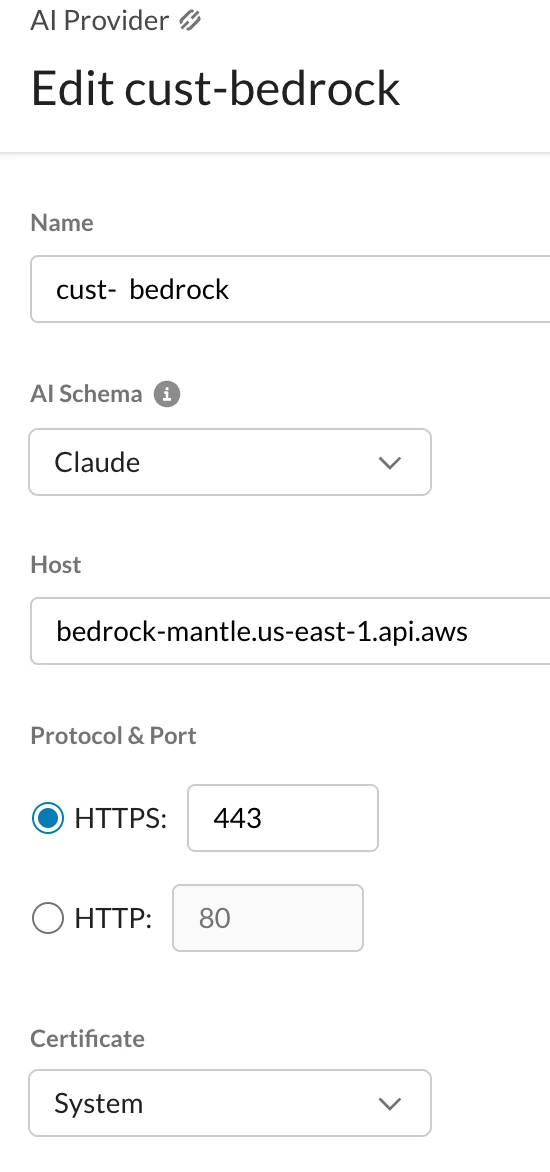
In the Netskope tenant, under Security Cloud Platform → AI Gateway → AI Provider, you link a custom AI provider that points at your Bedrock endpoint. The gateway ships with a set of predefined providers (Claude, OpenAI, Gemini, Cohere, Mistral, DeepSeek, OpenRouter, and more), but Bedrock access needs a Custom provider entry — this is where you register your Bedrock base URL so the gateway knows how to reach it.
Click New AI Provider, provide AWS Bedrock API endpoint and select schema Claude. Reminder - I am using AWS Bedrock Mantle in this example.
Once it’s created, it should be linked to the AI Gateway - move to Gateway Setup section, click Link Custom AI Providers, select the just created one and save.
Once that's linked, the AI Gateway exposes a stable proxy URL in the form of:
https://<your-tenant>.goskope.com/v1/<provider-name>
That URL is what Claude Desktop will talk to - not Bedrock directly.
Step 2: Create an authentication token
Under AI Gateway → Authentication Token & Group, create a token group and a token (call it something like claude). This token is what Claude Desktop presents to the AI Gateway on every request, separate from Bedrock authentication. Keeping these separate matters: it means you can rotate or revoke Claude Desktop's access without touching the Bedrock-side credentials at all.
Step 3: Point Claude Desktop at the gateway
To get started with 3rd party inference, open Claude Desktop, and go to Help → Troubleshooting → Enable Developer mode. Next, configure the connection: open Developer → Configure Third-Party interference and switch the connection type to Gateway. You'll need to fill in:
- Gateway base URL - the proxy URL from Step 1, make sure you append /anthropic to the path
- Gateway API key - your AWS API key
- Gateway auth scheme - bearer (or could be. an x-api-key header, depending on how your environment expects credentials)
- Custom inference headers - this will be used for authentication and correct policy matching against Netskope API Gateway. (Additional keys can be used if required for customization with the inference provider)
- Key: x-ns-aig-apikey
- Value: authentication token you have created at Step 2
- Credential kind — set to Static API key so the gateway config is the single source of truth (no fallback to another credential source)
- Model ID - I have used anthropic.claude-haiku-4-5 in my example - this can obviously be customized, adjusted or enriched
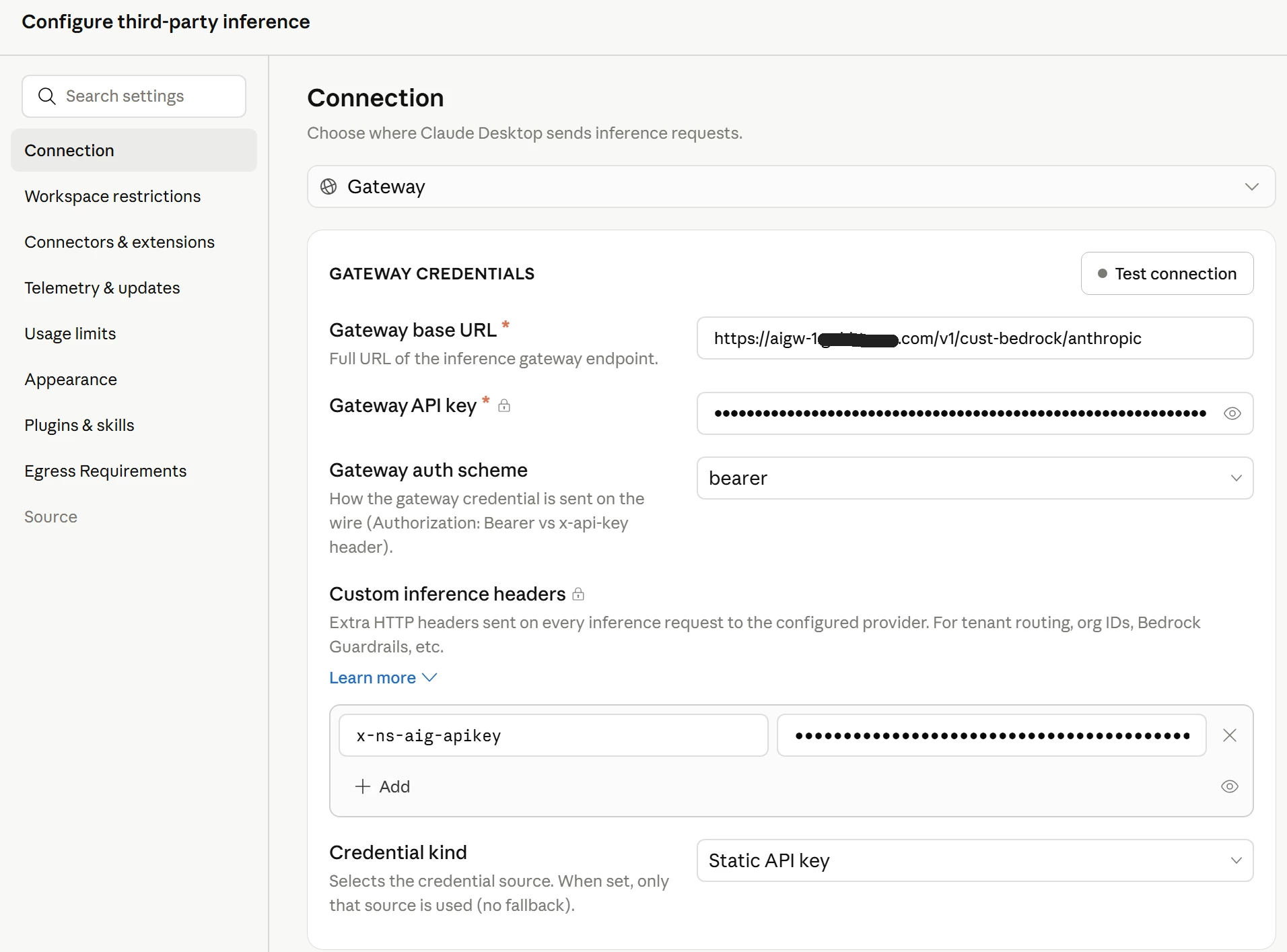
Hit Apply Changes, then Test connection to confirm the round trip works before you start chatting.
Step 4: Verify with a real conversation
Open a new chat and send something trivial. If everything is wired correctly, the response comes back exactly like it would talking to Anthropic directly - same Chat/Cowork/Code experience - except every request is now transiting Netskope AI Gateway.
Step 5: Turn on the policy layer
This is the part that makes the extra hop worthwhile. Under Policies → AI Gateway, you get three policy categories to layer on top of the raw connection:
- Access Control - restrict which token groups, AI providers/models, and activities (prompt vs. response) are allowed to flow at all
- DLP - apply data-loss-prevention profiles against prompts and responses. The out-of-the-box profile library includes frameworks like PCI-DSS, GDPR, HIPAA, GLBA, and US financial/SSN data patterns, so you can block or alert on regulated data before it ever reaches the model
- AI Guardrails - apply content-safety categories (prompt injection/jailbreak attempts, hate speech, content promoting crimes, weapons content, and more) with configurable confidence thresholds (Low/Medium/High) per category, plus your own custom topics on top of the predefined set
Guardrails profiles are reusable - build one (e.g., a profile named after your deployment) and attach it to as many policies as you need, with exclusion criteria for any traffic you want to carve out.
Step 6: Get full visibility into every request
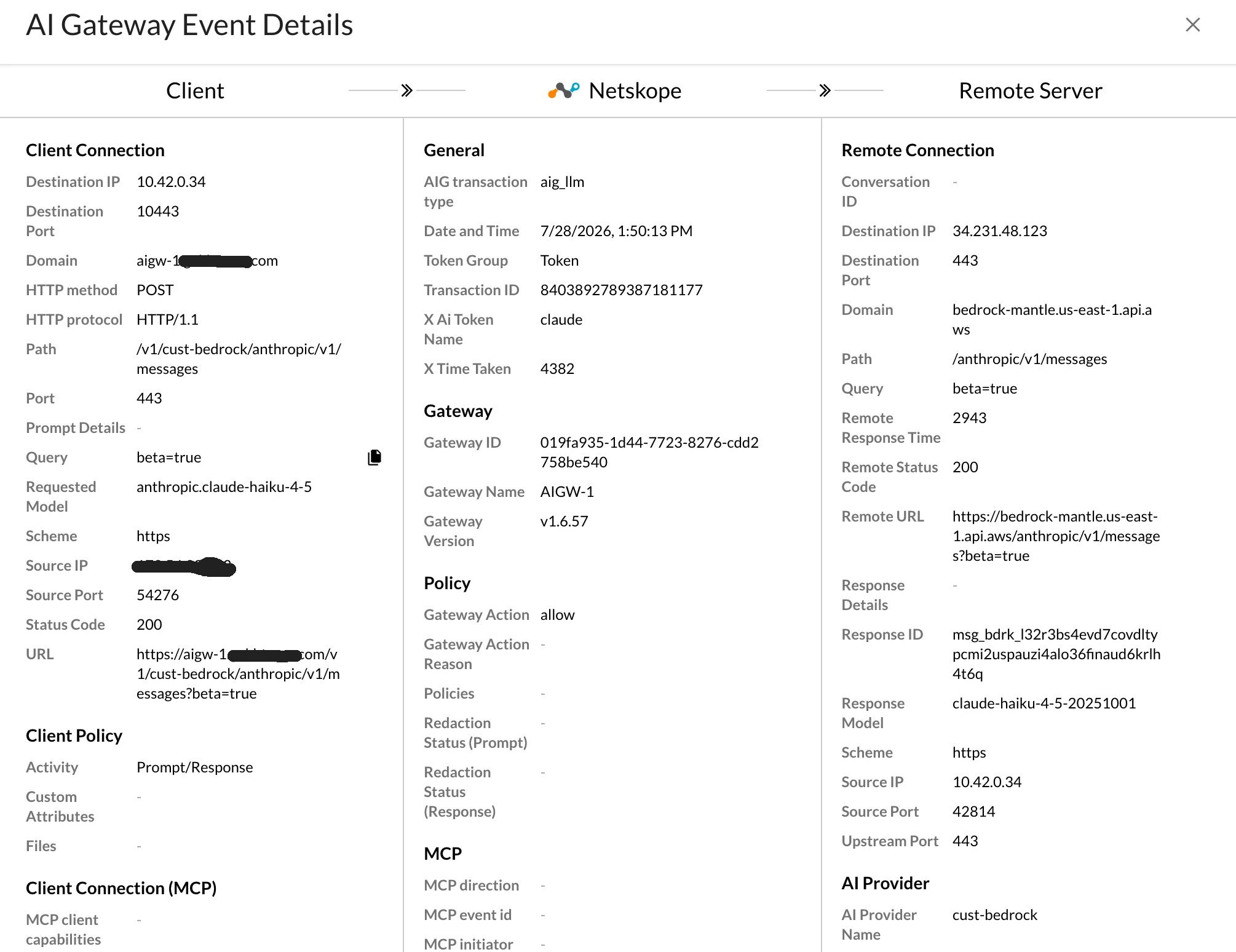
Every request the gateway proxies shows up under Skope IT → AI Gateway Events, broken into three panes — Client, Netskope, and Remote Server — so you can see the full path a request took: source IP and port on the client side, which gateway and policy evaluated it, and the destination (Bedrock's endpoint, the specific Claude model that served it, and token counts) on the far side. It's a genuinely useful debugging view when something doesn't behave the way you expect, since you can see the exact model ID, response code, and policy action for a single transaction.
Anything the guardrails or DLP policies flag lands in Incidents → AI Guardrails Incidents, with the matched category, match type, and the policy action taken (detection, alert, or block). Alert details drill down further into the specific transaction, including the app category and destination URL.
Why bother with the extra hop
Running Claude Desktop against your own Bedrock deployment already solves the "our data can't leave our cloud" problem. Adding a gateway in front of that solves the next problem: knowing what your users are actually sending to the model, and having a policy layer that can catch a leaked secret, a jailbreak attempt, or an out-of-policy topic before it becomes an incident report. For an org that's already standardized on an AI security gateway for other GenAI workloads, folding Claude Desktop's third-party inference into that same policy surface is a small amount of setup for a meaningful jump in visibility.



