
Question

Not showing Netskope IP on office network

  • August 19, 2026
  • 3 replies
  • 154 views

omkar.more3-c1a797e5

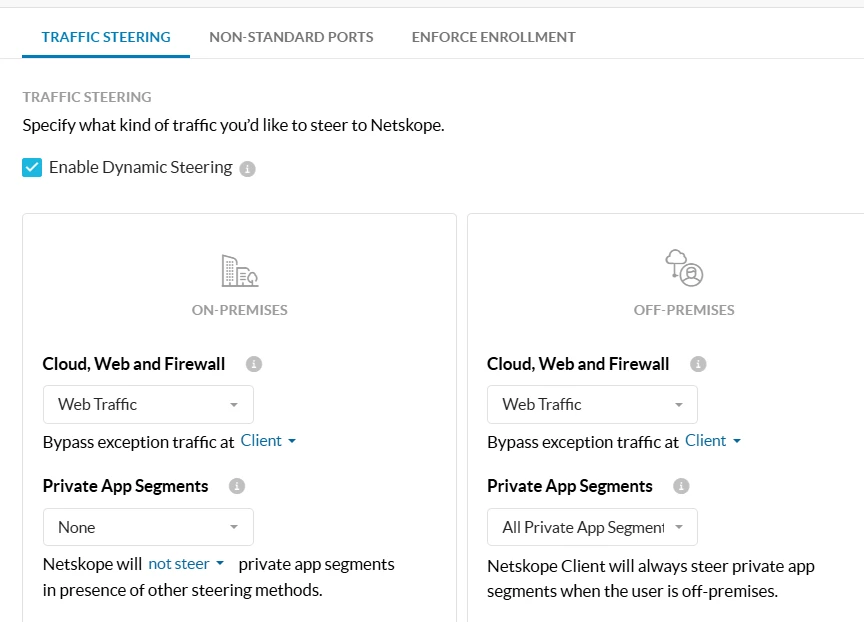
We have created a client config such that user connected to office network, their private access should be disabled. When they are outside office network, they are getting Netskope IP. But when in Office network, they are getting ISP IP. Why such behaviour in above steering config. This is the Steering config which we have created. Why it is taking ISP IP instead of Netskope IP when connected to office network.



3 replies

Eli
Netskope Employee
Forum|alt.badge.img+5
  • Netskope Employee
  • September 15, 2026

Hello,
When the user is on-premises, Private App traffic is intentionally excluded from Netskope steering (Private App Segments = None), so the traffic accesses the private app directly through the corporate network and the application's source IP appears as the corporate/ISP egress IP. When the user is off-premises, the private app traffic is steered through Netskope Private Access , so a Netskope egress IP is observed.


notskope
  • New Member III
  • September 22, 2026

Hello,
When the user is on-premises, Private App traffic is intentionally excluded from Netskope steering (Private App Segments = None), so the traffic accesses the private app directly through the corporate network and the application's source IP appears as the corporate/ISP egress IP. When the user is off-premises, the private app traffic is steered through Netskope Private Access , so a Netskope egress IP is observed.

None of this response makes any sense to me… NPA and SWG are different products. This is the SWG forum, and the user is asking why web traffic does not appear to be steered.


​@omkar.more3-c1a797e5 , have you checked that the Netskope client is not being blocked when on-prem? It could be failing to establish the tunnel and failing open.


omkar.more3-c1a797e5

Netskope client is not blocked when On-prem. All of a sudden, the user faces this issue. But when we disable and enable the Netskope again, the issue doesn’t appear and it is resolved.