


Dear Community Members,
We are excited to announce the beta release of the Netskope Identity Dashboard, your new unified entry point for the Netskope applications and services your organization uses. The Identity Dashboard brings application access, profile management, and user administration together in a single, streamlined interface — making it easier than ever to get to the resources you need.
As a user of the platform, your feedback is invaluable in helping us shape the experience. If you encounter any issues or have suggestions, please reach out to ciam@netskope.com.
What Is the Netskope Identity Dashboard?
The Identity Dashboard provides a single sign-on experience across connected Netskope platforms, including:
- Notification Portal
- Academy
- Support
- Community
- Partner Portals
Sign in once at id-dashboard.netskope.com and access any connected application throughout your session — no repeated logins required.
What's New
Unified Application Access
One launchpad for Netskope applications available to you. Each tile on the Your Apps page provides single-click access with automatic sign-in when your session is active.
Self-Service Profile Management
Update your personal details, job information, location, and topics of interest — all from a single place. Changes propagate automatically to supported Netskope platforms.
Organization Management (Organization Admins)
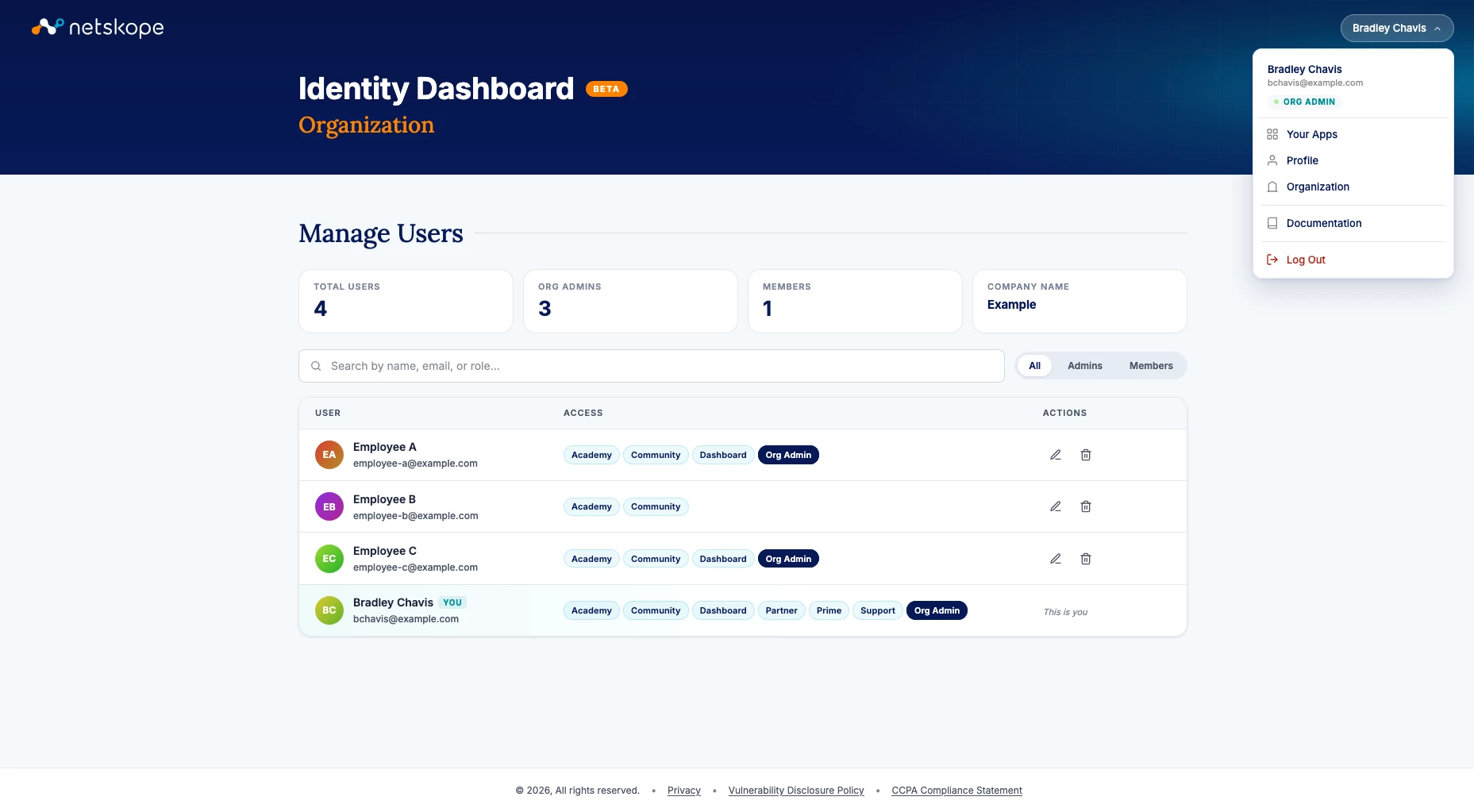
Designated Organization Admins have access to built-in tools to manage users, application access, and admin assignments on behalf of their company, all within the dashboard.
Getting Started
- Sign in to the Dashboard Navigate to id-dashboard.netskope.com and sign in using your Netskope Unified Login credentials. If your organization uses a federated identity provider, you will be redirected to your company's sign-in flow.
- Review your applications and update your profile The Your Apps page is your default landing point — select any tile to launch that application. While you're getting set up, visit the Profile section to fill in your personal details and preferences.
- Visit the Documentation section If you have questions, run into an issue, or want to learn more about any feature, the Documentation section within the Identity Dashboard is the best place to start.
- Explore Organization tools (Organization Admins only) If you have been designated as an Organization Admin, the Organization section provides tools for managing users and access within your company.
Need Organization Admin access? Contact us at ciam@netskope.com and our team will be happy to assist.
Frequently Asked Questions
Do I have to use the Identity Dashboard to access my Netskope applications?
No. You can continue accessing connected applications directly via their standard URLs. The Identity Dashboard is your unified hub, but it does not replace direct application access.
I can't access the Identity Dashboard. What should I check?
Confirm you are using the correct Netskope Unified Login credentials. If your organization uses a federated identity provider, make sure you are following your company's sign-in flow. If the issue persists, contact your Organization Admin or reach out to ciam@netskope.com.
My company does not have an Organization Admin. What should I do?
Organization Admin privileges are granted by an existing Organization Admin at your company. If your company doesn't currently have one — for example, because previously designated admins have departed — contact your Netskope representative or email ciam@netskope.com for assistance.
A user is missing from my Organization view.
The two most common reasons are: the user has not yet registered for a Netskope Unified Login account, or their account has not yet been linked to your organization. If you believe this is the case, contact your Netskope representative for assistance.
Why don't I see an application I expect to have access to?
Start by reaching out to your Netskope representative, as they can confirm what applications are provisioned for your organization. Application access is also managed at the organization level, so your Organization Admin can verify and adjust your individual access if needed.
I updated my profile, but the change isn't showing in another application.
Profile changes propagate to connected platforms, but you may need to sign out and back in for updates to appear everywhere. If the issue persists after signing back in, contact ciam@netskope.com.
We are committed to making your experience with Netskope simpler and more seamless. The Identity Dashboard is an important step in that journey, and we look forward to continuing to improve it based on your feedback.
Please contact your Netskope representative or email ciam@netskope.com if you have any questions.
Thank you for your continued partnership.
Sincerely, Netskope Customer Solutions Group



