
Hello Team
1. Executive Summary
Currently, long-form PDF reports generated by Netskope (e.g., daily activity or security mail reports) fail to open correctly in industry-standard PDF viewers like Adobe Acrobat Reader.
Users receive a critical warning: "The dimensions of this page are out-of-range. Page content might be truncated." This issue limits the ability for compliance and security teams to review, archive, and audit long reports using professional PDF tools.
2. Proposed Solutions
To ensure cross-platform compatibility and adherence to international standards, we suggest the following enhancements to the PDF export engine:
Option A (Pagination): Implement logic to automatically split "infinite-scroll" web reports into multiple standard-sized pages (e.g., A4 or Letter) once the content exceeds the 200-inch threshold.
Option B (Scaling Factor): Upgrade the PDF export version to PDF 1.6+ and implement the /UserUnit parameter.
This allows the engine to scale the coordinate system, enabling single-page reports to exceed 200 inches while remaining within the 14,400-unit limit recognized by strict rendering engines.
3. Scenario Description
Our security team relies on Netskope to generate comprehensive daily reports and enable "Expand tables to show all rows" in Schedule Delivery Advanced options.
These reports often aggregate a large volume of data into a single, continuous vertical page.
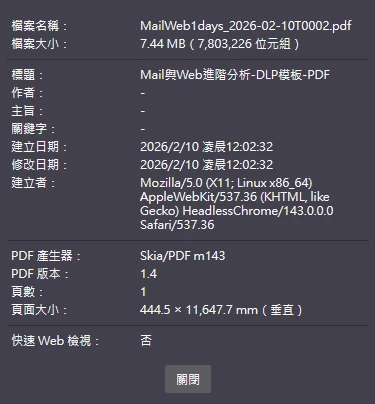
While these files are viewable in web browsers (Chrome/Firefox), they are practically unusable in Adobe Acrobat Reader—the enterprise standard for document management—because the physical page height often reaches 11,648 mm (~458 inches), triggering a hard-coded rendering limit in Adobe's engine.
4. Technical Analysis
The current export implementation presents a technical contradiction:
File Specification: The report is currently exported as PDF 1.4.
The Conflict: Under the PDF 1.4 specification, the maximum allowed value for any page dimension is 14,400 units (where 1 unit = 1/72 inch, totaling 200 inches).
The Violation: The generated report specifies a height of approximately 33,018 units (458 inches), which is roughly 2.3x the legal limit for PDF 1.4.
Root Cause: Since PDF 1.4 does not support the /UserUnit scaling factor (introduced in v1.6), Adobe Reader correctly identifies the file as non-compliant.
5. References
1.
ISO 32000-1:2008 (PDF 1.7): Annex C, Table C.1 (Implementation Limits) - Specifies the 14,400-unit limit for default user space.(page 650)
https://opensource.adobe.com/dc-acrobat-sdk-docs/pdfstandards/PDF32000_2008.pdf
The minimum page size should be 3 by 3 units in default user space; the maximum should be 14,400 by 14,400 units. In versions of PDF earlier than 1.6, the size of the default user space unit was fixed at 1⁄72 inch, yielding a minimum of approximately 0.04 by 0.04 inch and a maximum of 200 by 200 inches. Beginning with PDF 1.6, the size of the unit may be set on a page-by-page basis; the default remains at 1/ 72 inch.
2.
Adobe PDF Reference v1.4: Section 8.1 (Implementation Limits) - Confirms the legacy coordinate system boundaries.(page 707)
https://opensource.adobe.com/dc-acrobat-sdk-docs/pdfstandards/pdfreference1.4.pdf
The minimum allowed page size in Acrobat 4.0 is 3 by 3 units in default user
space (approximately 0.04 by 0.04 inch); the maximum is 14,400 by 14,400
units (200 by 200 inches). (See implementation note 120 in Appendix H.)
3.
Adobe PDF Reference v1.6: Section 3.6.1 (Page Objects) - Formalizes the introduction of the /UserUnit parameter to support oversized pages.(page 122)
https://opensource.adobe.com/dc-acrobat-sdk-docs/pdfstandards/pdfreference1.6.pdf
UserUnit number (Optional; PDF 1.6) A positive number giving the size of default user space
units, in multiples of 1⁄72 inch. The range of supported values is implementation-dependent; see implementation note 171 in Appendix H.
Default value: 1.0 (user unit is 1⁄72 inch).
4.
PDF Info