



Netskope AI SecOps can stream case, user-risk, and AI-risk events into CrowdStrike Falcon Next-Gen SIEM. Once those events are available in Falcon, the integration can go beyond visibility: an NG-SIEM correlation rule can create a detection, an existing CrowdStrike AI Agent can enrich the event with endpoint and identity context, and a Fusion workflow can apply the resulting verdict to downstream response actions.
This article builds on Sending Netskope AI SecOps Events to CrowdStrike Falcon Next-Gen SIEM. Complete that ingestion setup first, including the HTTP Event Collector endpoint with /raw and the netskope-sse parser.
| IMPORTANT Build and validate this workflow in a test tenant before enabling response actions in production. |
What this solution does
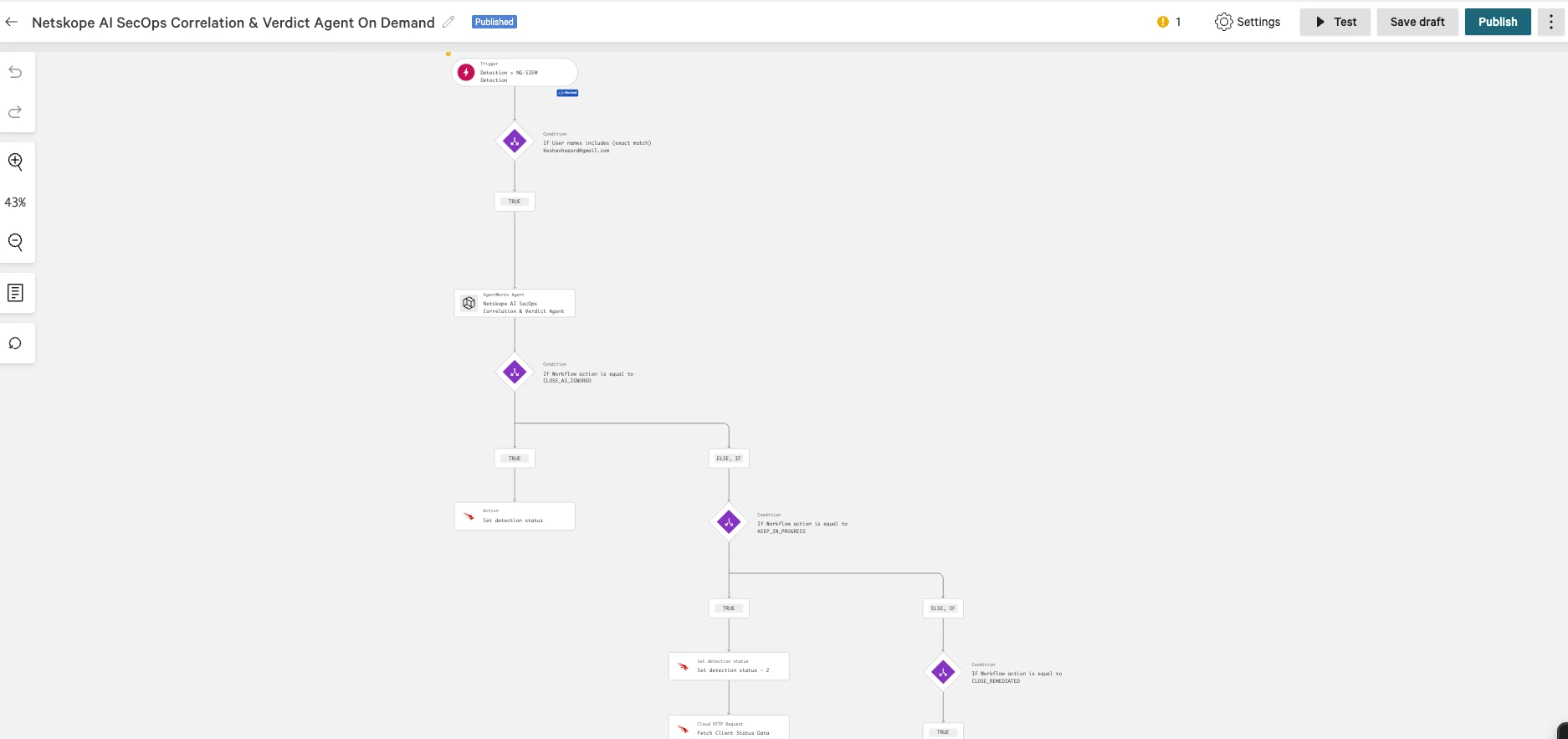
The completed flow performs the following steps:
- Netskope AI SecOps sends an event such as case.created, case.assigned, or risk.user.threshold_exceeded to Falcon Next-Gen SIEM.
- The netskope-sse parser maps the event into searchable fields.
- An NG-SIEM correlation rule creates a CrowdStrike detection.
- A Fusion workflow invokes the existing Netskope AI SecOps CrowdStrike AI Agent and passes the real Detection ID and Netskope context to it.
- The workflow receives the agent's structured verdict and recommended actions.
- Fusion branches on the verdict. Depending on policy and available integrations, it can update the detection status, apply a Netskope device tag, adjust a Netskope UCI recommendation, or restrict user access.
Netskope AI SecOps event → NG-SIEM correlation rule → CrowdStrike detection → AI Agent enrichment → structured verdict → guarded response
Prerequisites
- Netskope AI SecOps access and permission to configure outbound webhooks
- A Falcon HTTP Event Collector data connection using the netskope-sse parser or use the parser mentioned on the article: Sending Netskope AI SecOps Events to CrowdStrike Falcon Next-Gen SIEM
- Permission to create NG-SIEM correlation rules and detections
- The published Netskope AI SecOps CrowdStrike AI Agent available as a Fusion action
- CrowdStrike Fusion workflow access
- Netskope API credentials for any optional client lookup, tagging, or access-control action
Do not place collector tokens, API keys, or tenant-specific URLs in the article, screenshots, or workflow notes.
1. Verify the parsed Netskope event
Before creating automation, confirm that a fresh event is searchable in Falcon. Start with one event type:
#Vendor = netskope
| event.action = "case.created"
For a controlled demonstration, case.assigned is also useful because assigning a test case is an explicit action:
#Vendor = netskope
| event.action = "case.assigned"
Confirm that the event exposes the following context where applicable:
- event.id
- event.action
- event.severity
- organization.id
- rule.id
- user.name
- the case identifier in the parsed Netskope vendor data
- the original vendor payload under Vendor.data.*
Use event.action for the correlation condition. Do not assume that the original raw type field is available as Vendor.type; with the parser, it may remain under the nested vendor data while event.action is the normalized field.
case.created does not always contain a hostname. If the hostname is absent, correlate another Netskope alert or event for the same user and case within the investigation window. Never fabricate a hostname.
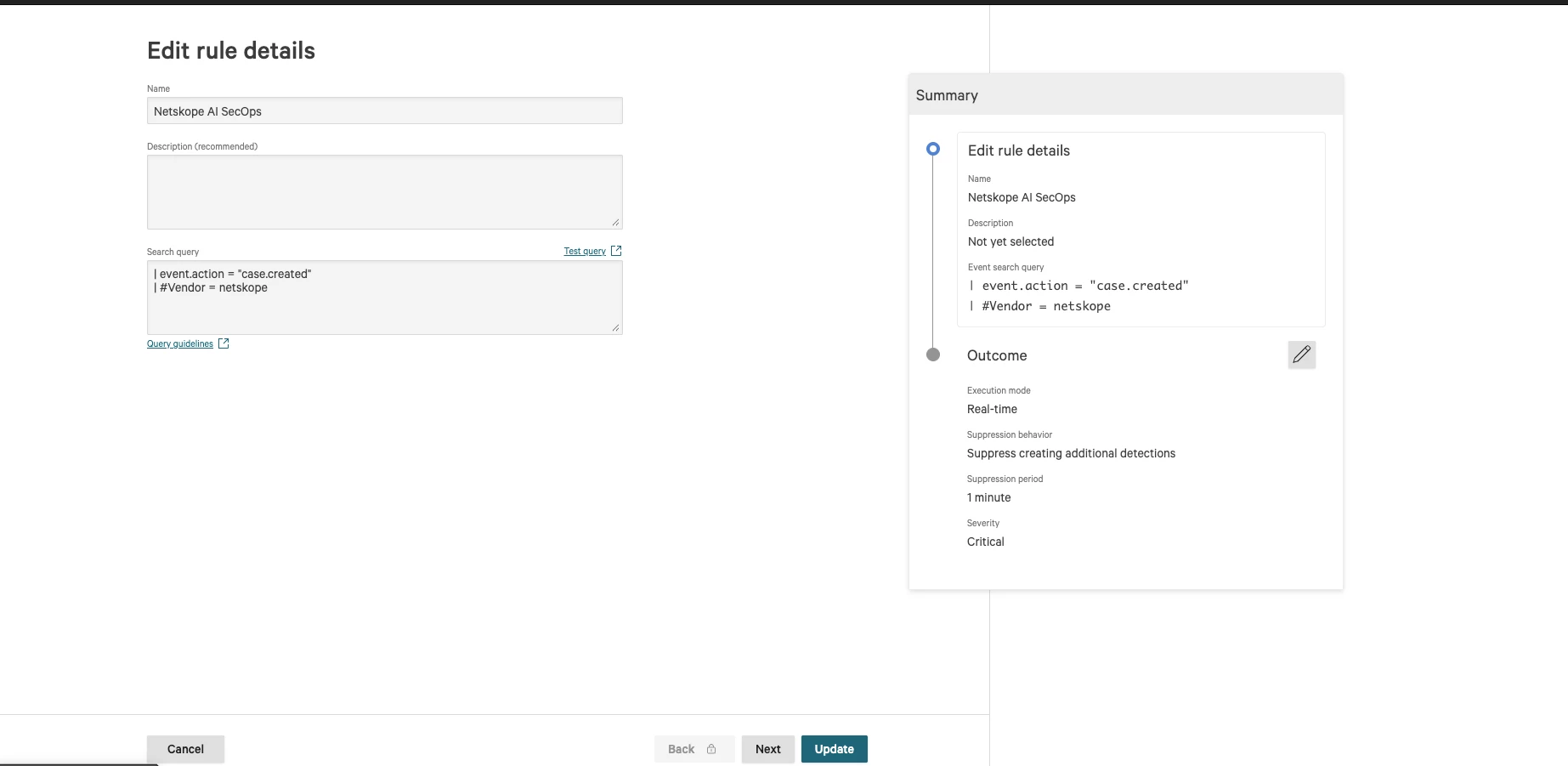
2. Create the NG-SIEM correlation rule
Create a rule that turns the selected Netskope event into a CrowdStrike detection. During testing, use only one trigger event to avoid duplicate detections.
Suggested production condition
#Vendor = netskope
| event.action = "case.created"
Optionally create separate rules for high-value events such as risk.user.threshold_exceeded. Separate rules make the trigger source and response policy easier to audit.
Configure the rule to:
- create a detection;
- retain the Netskope case ID, user, event action, timestamp, severity, score, risk note, and hostname when present;
- group or deduplicate on the Netskope case identifier for an appropriate time window; and
- give the detection a clear name, such as Netskope AI SecOps Case.
Use the exact case-ID field shown in your parsed tenant. With an envelope payload, it may be nested under the vendor data.
3. Use the existing AI Agent in the Fusion workflow
Use the NG-SIEM detection created by the correlation rule as the workflow trigger. The Detection ID must come directly from the trigger. A fabricated or stale mock ID can cause the Set detection status action to fail even when the rest of the workflow is valid.
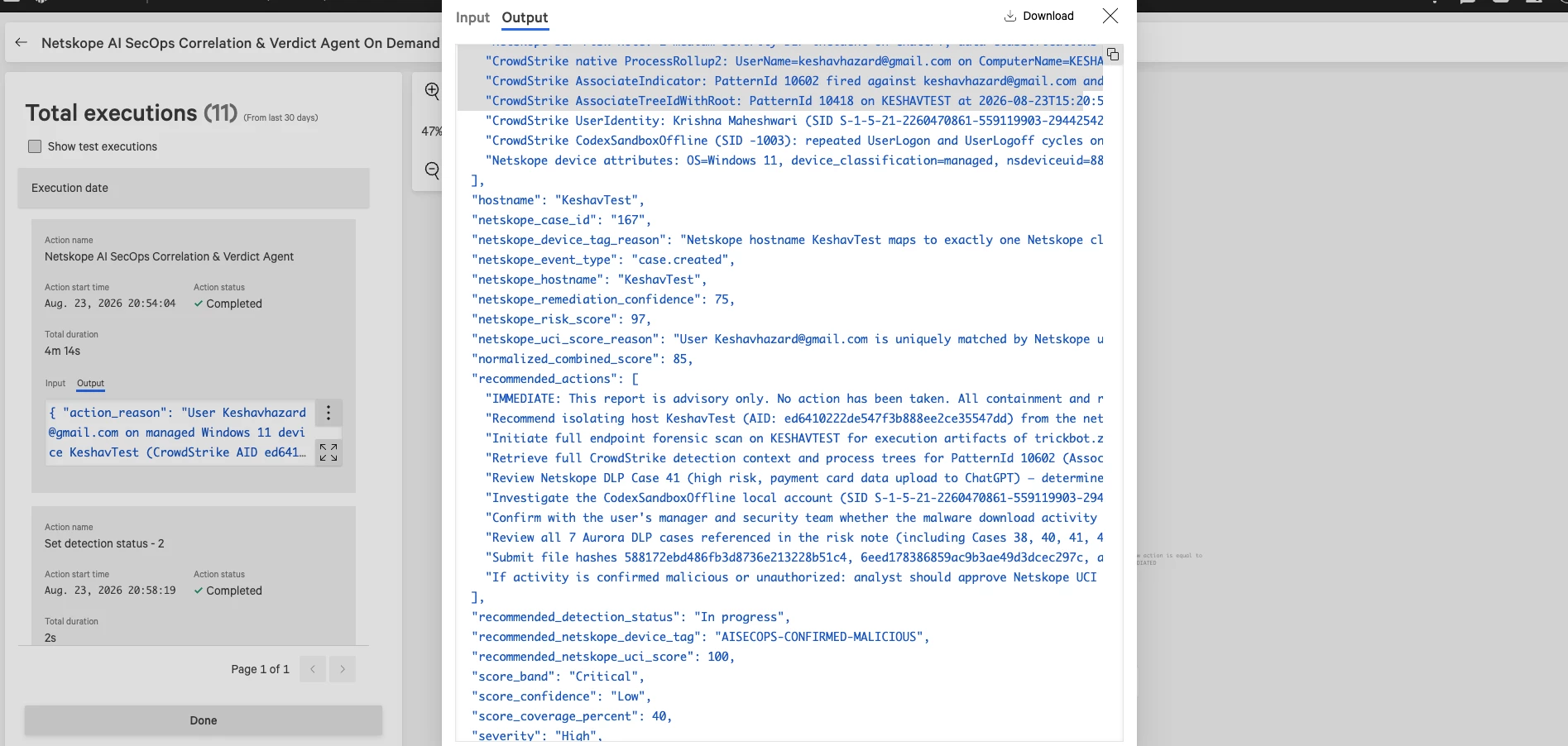
Add the Run AI Agent action and select the agent Netskope AI SecOps Correlation & Verdict Agent This workflow uses the agent; it does not create or configure it.
Map the detection context into the existing agent action:
| AI Agent input | Fusion source |
|---|---|
| Detection ID | Detection ID from the workflow trigger |
| Event and case identifiers | Parsed Netskope fields carried into the detection |
| Event action and timestamp | Normalized NG-SIEM event fields |
| Username | Parsed Netskope username |
| Hostname | Exact Netskope hostname when present; preserve capitalization |
| Severity and risk context | Netskope severity, score, UCI, band, and risk note available in the detection |
Use the existing agent outputs as Fusion conditions and action values:
| Existing agent output | Workflow use |
|---|---|
| verdict | Select the benign, low-risk, suspicious, malicious, or insufficient-data branch |
| confidence | Prevent low-confidence results from making a device change |
| netskope_hostname | Fetch the corresponding Netskope client record |
| normalized_risk_score | Add risk context to the workflow result and analyst view |
| device_tag_action | Select ADD, REMOVE, or NO_CHANGE |
| device_tag_value | Supply an approved tag value |
| netskope_access_action | Select the access-control branch when enabled |
| reason | Record why the action was recommended |
If netskope_hostname is empty, do not invent or uppercase a hostname. Route the execution to the no-device-action branch.
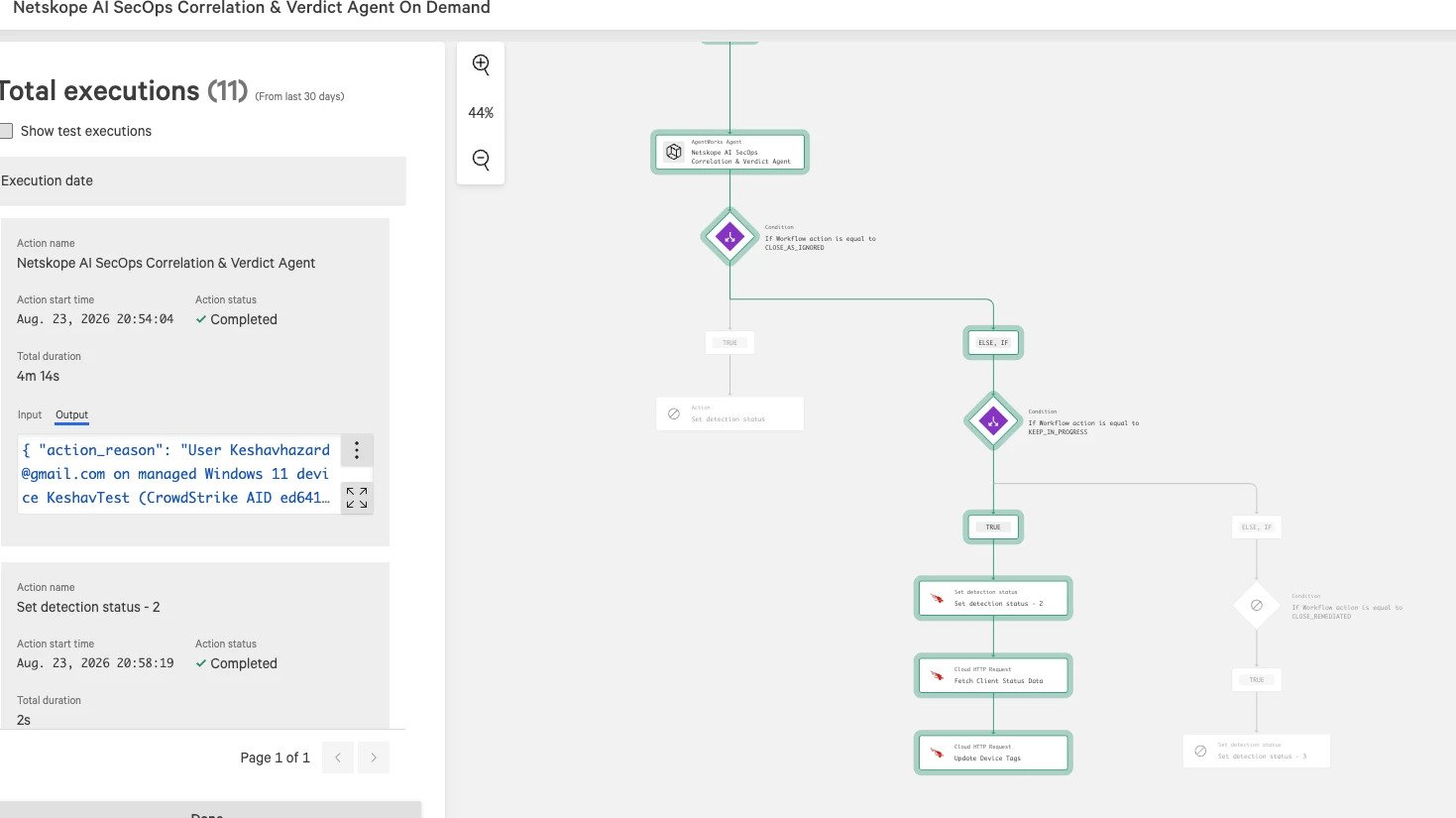
The workflow can use the following sequence:
- Trigger on the Netskope AI SecOps correlation-rule detection.
- Run the existing Netskope AI SecOps CrowdStrike AI Agent.
- Branch on verdict and confidence.
- Set the CrowdStrike detection status using the trigger's Detection ID.
- If a Netskope device action is recommended, fetch the Netskope client record using netskope_hostname.
- Validate the lookup result before reading the first array item.
- Apply only the response actions supported and enabled in the tenant.
- Record the action result or skip reason.
Device-tag workflow path
The device-tag branch should follow this path:
AI Agent verdict
↓
Check verdict, confidence, and device_tag_action
↓
Fetch Netskope client status using the exact netskope_hostname
↓
Confirm execution = SUCCESS and count > 0
↓
Read nsdeviceuid, userkey, and hostname from result[0]
↓
Call the supported Netskope device-tag action/API
↓
Record applied, skipped, or failed status in the workflow output
The recommended enforcement condition is:
verdict is SUSPICIOUS or MALICIOUS
AND confidence meets the approved threshold
AND device_tag_action is ADD or REMOVE
AND netskope_hostname is not empty
Use separate branches for ADD, REMOVE, and NO_CHANGE. This prevents a free-form agent response from becoming an unapproved action.
The device-tag action should receive the following values only after the client lookup succeeds:
| Device-tag action input | Source |
|---|---|
| Device UID | FetchClientStatusData.result[0].nsdeviceuid |
| User key | FetchClientStatusData.result[0].userkey |
| Hostname | FetchClientStatusData.result[0].hostname |
| Tag operation | Agent device_tag_action after allow-list validation |
| Tag value | Agent device_tag_value after allow-list validation |
| Audit reference | Detection ID from the Fusion trigger |
Use an allow-list of approved tag values—for example, monitoring and high-risk tags—rather than allowing the agent to invent arbitrary tags. If device-tag updates are not enabled or supported in the tenant, keep this branch disabled and return device_tag_status = not_enabled.
Suggested verdict branches
| Agent verdict | Detection status | Device tag | Netskope UCI/access response |
|---|---|---|---|
| BENIGN | Closed and tagged as ignored | No change | No change |
| LOW_RISK | Closed or analyst-policy dependent | No change | No change |
| SUSPICIOUS | In progress | Add monitoring tag when supported | Apply only the bounded score recommendation; consider limited restriction |
| MALICIOUS | In progress and escalate | Add high-risk tag when supported | Apply approved UCI change and restrict access |
| INSUFFICIENT_DATA | In progress | No change | No change; request analyst review |
Do not auto-close a malicious detection. Keep it visible for containment, escalation, and evidence review.
Score-change fields are recommendations. Only execute changes supported by the target product and approved by policy. Apply minimum and maximum bounds to every delta.
4. Safely fetch Netskope client identifiers
A successful client-status request can return:
{
"result": [
{
"hostname": "ExampleHost",
"nsdeviceuid": "<device-uid>",
"userkey": "<user-key>"
}
],
"status": {
"count": 1,
"execution": "SUCCESS",
"status_code": 200
}
}
Before any action references result[0], add a condition that verifies:
- the agent recommended the action;
- status.execution equals SUCCESS; and
- status.count is greater than 0.
Only the success branch should map:
FetchClientStatusData.result[0].nsdeviceuid
FetchClientStatusData.result[0].userkey
FetchClientStatusData.result[0].hostname
If result is empty, skip the device action and record a result such as:
device_tag_action = skipped
device_tag_status = client_not_found
device_tag_reason = No Netskope device matched the case-preserved hostname.
This guard prevents an index out of bounds: 0 workflow failure.
When inserting data into a later HTTP action, select the output data pill exposed by the previous action. Do not manually reference a display label such as FetchClientStatus.response; Fusion variables are based on the action node's available output schema.
5. Test the complete flow
For every replayed test event, use a new event ID and a current timestamp. This avoids duplicate suppression and correlation windows that exclude old samples.
Validate the flow in this order:
- Send one case.created or case.assigned event.
- Confirm that the event is parsed and searchable by event.action.
- Confirm that the correlation rule creates a real detection.
- Confirm that Fusion receives the real Detection ID.
- Confirm that the selected AI Agent action exposes the verdict, hostname, score, and action values to Fusion.
- Confirm that the username and Netskope hostname retain their original values and case.
- Test the client-found and client-not-found branches.
- Confirm that benign, suspicious, malicious, and insufficient-data verdicts reach the intended actions.
- Enable device tagging, UCI modification, or access restriction only after the non-destructive test path succeeds.
The final workflow output should make the response easy to audit. Include the Detection ID, username, hostname, verdict, normalized score, requested tag, device-tag status, access action, and reason as separate fields.
Troubleshooting
| Symptom | Likely cause | Resolution |
|---|---|---|
| No correlation-rule detection | Wrong field, old timestamp, or duplicate event | Search with event.action, send a fresh ID and timestamp, and verify the rule window |
| Event is unparsed | Wrong or missing parser | Select the netskope-sse parser on the Falcon data connection |
| Raw event is empty | Collector URL does not use the raw endpoint | Append /raw to the HTTP Event Collector URL |
| Collector returns 401 or 403 | Invalid or expired API key | Replace and securely rotate the collector credential |
| Host lookup returns null | Hostname was changed or the source event has no hostname | Preserve the Netskope value exactly; correlate another event when the hostname is absent |
| index out of bounds: 0 | Client lookup returned result: [] | Check execution and count before accessing result[0] |
| Unknown workflow variable | A display label was typed instead of selecting an output field | Insert the previous action's exposed output data pill |
| Set detection status fails | Mock or invalid Detection ID | Map the Detection ID directly from the detection trigger |
Security and operational safeguards
- Use least-privilege collector and Netskope API credentials.
- Store secrets in supported credential fields, not prompts or payload templates.
- Add a confidence threshold and a no-action branch.
- Require human approval for high-impact access restrictions until the workflow is validated.
- Keep an audit trail of the input event, agent verdict, score changes, and executed or skipped actions.
- Apply tags, UCI changes, and access restrictions only when the required identifiers are present.
Conclusion
This demonstration showed an end-to-end integration between Netskope AI SecOps and CrowdStrike Next-Gen SIEM: events were correlated and enriched by a CrowdStrike AI Agent, while device tagging and Netskope access controls turned the verdict into action.



