



 Netskope Global Technical Success (GTS)
Anthropic Claude - Block Google SSO for login
Netskope Cloud Version - 135
Objective
Anthropic Claude - Block Google SSO for login
Prerequisite
Netskope CASB Inline & SWG license is required
Context
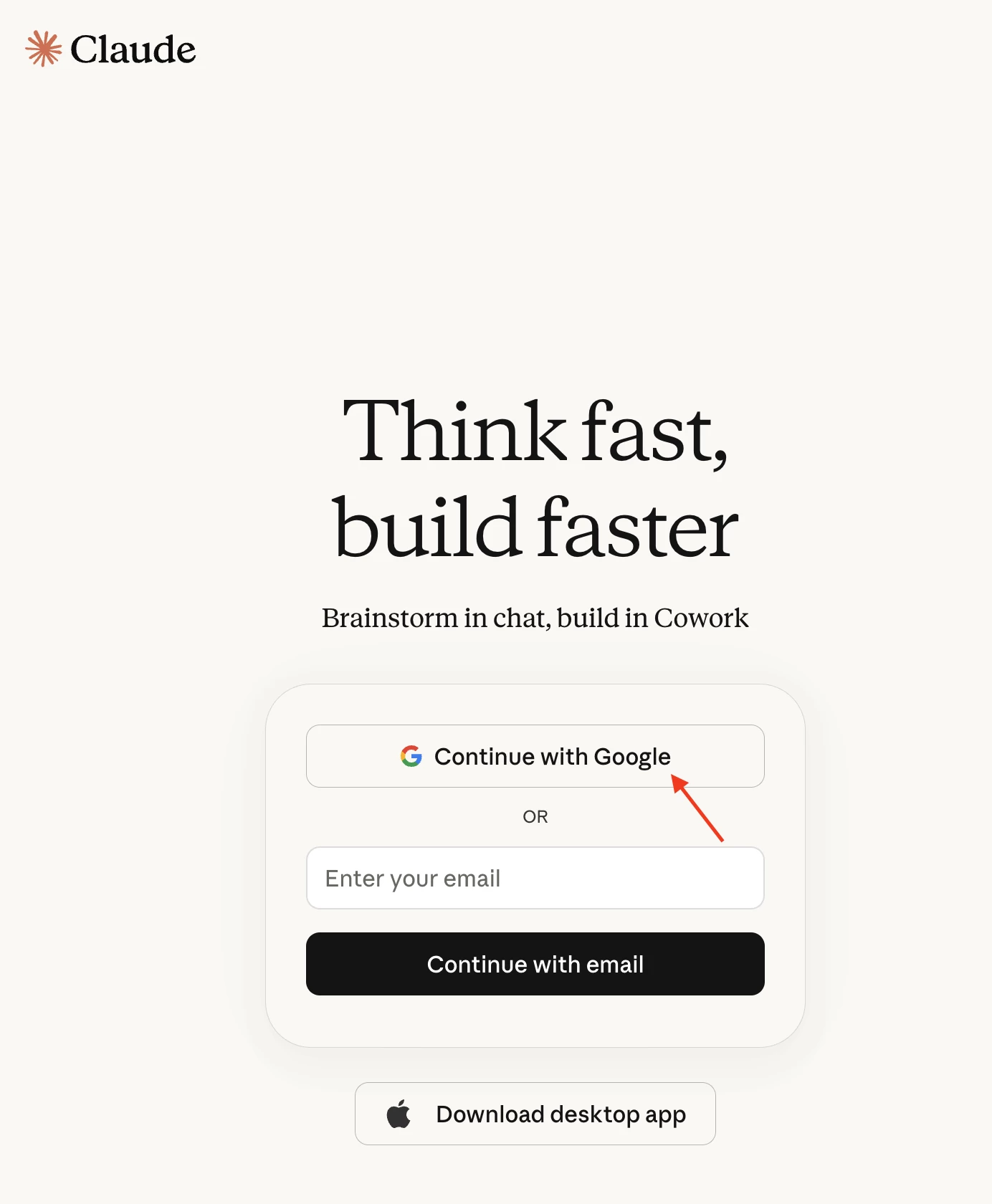
Anthropic Claude provides Single Sign-On (SSO) integration with Google accounts “Continue With Google”. This knowledge base article focuses on preventing end-users from utilizing Google SSO to access Anthropic Claude.

Do You Know?
- The mechanism that works behind this Continue With Google is called OAuth (Open Authorization) is an industry-standard security framework that allows apps to access your data or interact with other services on your behalf without you having to share your password. You have likely used OAuth if you have ever clicked a button that says "Sign in with Google," "Continue with Apple," or "Log in with Facebook" when using a new app or website.
- When an end user selects ‘Image 1 - Continue with Google’ on the Claude webpage, the authentication request is redirected to:
https://accounts.google.com/v3/signin/accountchooser?access_type=offline&client_id=1062961139910-l2m55cb9h51u5cuc9c56eb3fevouidh9.apps.googleusercontent.com&display=popup&enable_granular_consent=true&gis_params=GBMqK1hheDBFQitGaGdSbTBDK1dSbGdxYWU3MURhbkNYREo3dDlOYVhVbUozQ0k4AUIJYXV0aDMyMTA3aAE&gsiwebsdk=gis_attributes&include_granted_scopes=true&origin=https%3A%2F%2Fclaude.ai&prompt=consent&redirect_uri=gis_transform&response_mode=form_post&response_type=code&scope=openid+profile+email&dsh=S857320769%3A1780295127845381&o2v=1&service=lso&flowName=GeneralOAuthFlow&opparams=%253Fresponse_mode%253Dform_post%2526enable_granular_consent%253Dtrue%2526gis_params%253DGBMqK1hheDBFQitGaGdSbTBDK1dSbGdxYWU3MURhbkNYREo3dDlOYVhVbUozQ0k4AUIJYXV0aDMyMTA3aAE&continue=https%3A%2F%2Faccounts.google.com%2Fsignin%2Foauth%2Fconsent%3Fauthuser%3Dunknown%26part%3DAJi8hAMq_RkcC56ZA0spNJthuJUvYZdD0NiaDgDTV6SBDaAUxtoswMjCUlh1D_Qr94y-GoCyF_syClCk15afVgiUxsiEfp_5jhNoaBjk2woIHX3ZiEM8IaRzpBkwGDlx9VseXYaJJrqw7_CzCbXJItaNhvasXMYnNST0vebBEoBQkLYo9ZE_-JQsDFQ-O_AVWbZoTqxSf4Wu5kXBMSgpUMgPR0f3kMmiekdELL6BFw-VmvhgGizSZSwFNpfN264HpJ8ayL3lp2XVnNhTiRl8_QLkoqesKtJ-ZhVbyXLI9BHdXucHzPaT-9z4ubqF_5n7PvCF87YqXaWxhcMawiLB4JghAgcnfqiaM_CpYhjKIbVpbCZLnlYPOFSWzA7rqaWhEaK9X7Ek6t6R8G0T0DWWvCSBpytR5RKYGIAeOWxR1njdAzszRmgCAhIfta4XemupuC_QqvK4h_9-zz0yWHepDBpLl0y96uENkQ%26flowName%3DGeneralOAuthFlow%26as%3DS857320769%253A1780295127845381%26client_id%3D1062961139910-l2m55cb9h51u5cuc9c56eb3fevouidh9.apps.googleusercontent.com%26requestPath%3D%252Fsignin%252Foauth%252Fconsent%23&app_domain=https%3A%2F%2Fclaude.ai
- To block traffic destined for this URL, we will use a regex-based pattern that matches specific keywords, as highlighted below:
https://accounts.google.com/v3/signin/accountchooser?access_type=offline&client_id=1062961139910-l2m55cb9h51u5cuc9c56eb3fevouidh9.apps.googleusercontent.com&display=popup&enable_granular_consent=true&gis_params=GBMqK1hheDBFQitGaGdSbTBDK1dSbGdxYWU3MURhbkNYREo3dDlOYVhVbUozQ0k4AUIJYXV0aDMyMTA3aAE&gsiwebsdk=gis_attributes&include_granted_scopes=true&origin=https%3A%2F%2Fclaude.ai&prompt=consent&redirect_uri=gis_transform&response_mode=form_post&response_type=code&scope=openid+profile+email&dsh=S857320769%3A1780295127845381&o2v=1&service=lso&flowName=GeneralOAuthFlow&opparams=%253Fresponse_mode%253Dform_post%2526enable_granular_consent%253Dtrue%2526gis_params%253DGBMqK1hheDBFQitGaGdSbTBDK1dSbGdxYWU3MURhbkNYREo3dDlOYVhVbUozQ0k4AUIJYXV0aDMyMTA3aAE&continue=https%3A%2F%2Faccounts.google.com%2Fsignin%2Foauth%2Fconsent%3Fauthuser%3Dunknown%26part%3DAJi8hAMq_RkcC56ZA0spNJthuJUvYZdD0NiaDgDTV6SBDaAUxtoswMjCUlh1D_Qr94y-GoCyF_syClCk15afVgiUxsiEfp_5jhNoaBjk2woIHX3ZiEM8IaRzpBkwGDlx9VseXYaJJrqw7_CzCbXJItaNhvasXMYnNST0vebBEoBQkLYo9ZE_-JQsDFQ-O_AVWbZoTqxSf4Wu5kXBMSgpUMgPR0f3kMmiekdELL6BFw-VmvhgGizSZSwFNpfN264HpJ8ayL3lp2XVnNhTiRl8_QLkoqesKtJ-ZhVbyXLI9BHdXucHzPaT-9z4ubqF_5n7PvCF87YqXaWxhcMawiLB4JghAgcnfqiaM_CpYhjKIbVpbCZLnlYPOFSWzA7rqaWhEaK9X7Ek6t6R8G0T0DWWvCSBpytR5RKYGIAeOWxR1njdAzszRmgCAhIfta4XemupuC_QqvK4h_9-zz0yWHepDBpLl0y96uENkQ%26flowName%3DGeneralOAuthFlow%26as%3DS857320769%253A1780295127845381%26client_id%3D1062961139910-l2m55cb9h51u5cuc9c56eb3fevouidh9.apps.googleusercontent.com%26requestPath%3D%252Fsignin%252Foauth%252Fconsent%23&app_domain=https%3A%2F%2Fclaude.ai
Regex .*accounts.google.com.*signin.*oauth.*claude.ai.*
With the above regex, any URL containing all of the four specified keywords will be blocked.
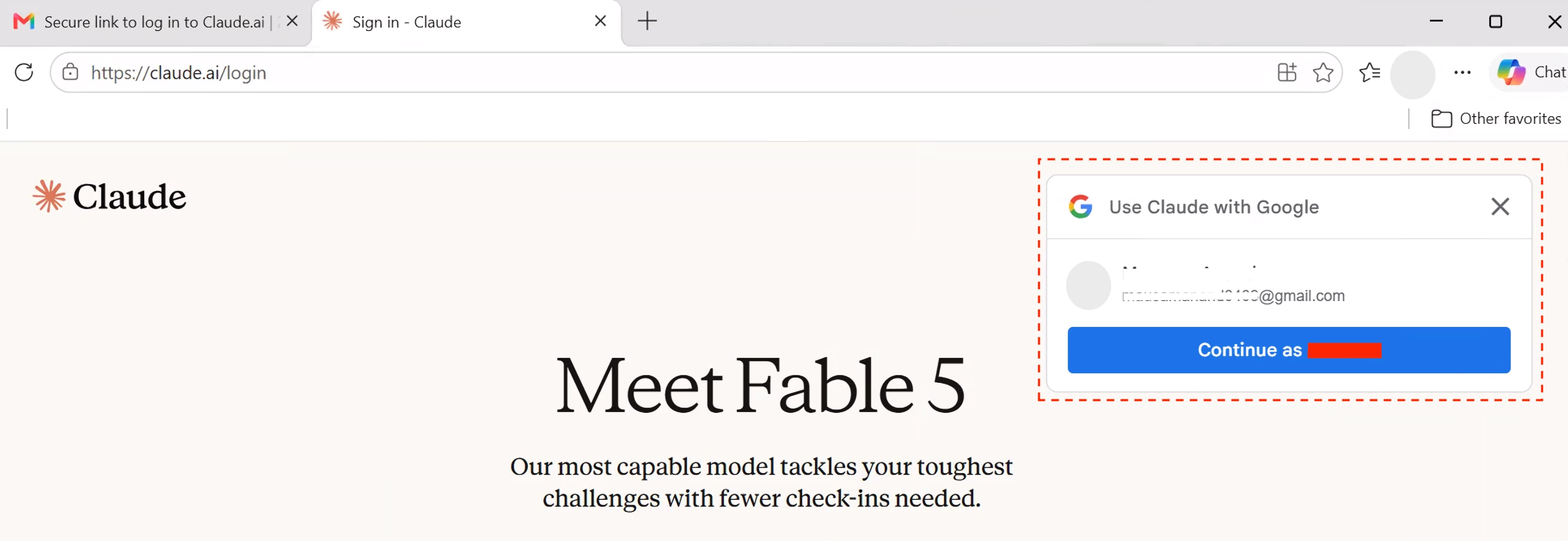
- When an end user selects ‘Image 2 - Google SignIn Prompt’ on the Claude webpage, the authentication request is redirected to:
https://accounts.google.com/gsi/issue?user_id=101567341954083075042&client_id=1062961139910-l2m55cb9h51u5cuc9c56eb3fevouidh9.apps.googleusercontent.com&origin=https%3A%2F%2Fclaude.ai&select_by=user&consent_acquired=false&token=APmKOA7-J1SubDrdUEnhhjVhHh2_%3A1781167040749&at=APmKOA7-J1SubDrdUEnhhjVhHh2_%3A1781167040749&as=MZVYSSHRU7Fgk0ax9dxy8nsdz3z3WfRI40ftUW_E4A4&ui_mode=card&approval_state=!ChQ2RWFPWW9EUTVKRVFmNmpfMF9QNhIfTV9Jem96cHd0b1lXNEJxcmlYbTVkb21pamtKZDZ4aw%E2%88%99AKphhQwAAAAAaivFQOusCNdkEI61CJZFPooVKcbVYXV-
- To block traffic destined for this URL, we will use a regex-based pattern that matches specific keywords, as highlighted below:
https://accounts.google.com/gsi/issue?user_id=101567341954083075042&client_id=1062961139910-l2m55cb9h51u5cuc9c56eb3fevouidh9.apps.googleusercontent.com&origin=https%3A%2F%2Fclaude.ai&select_by=user&consent_acquired=false&token=APmKOA7-J1SubDrdUEnhhjVhHh2_%3A1781167040749&at=APmKOA7-J1SubDrdUEnhhjVhHh2_%3A1781167040749&as=MZVYSSHRU7Fgk0ax9dxy8nsdz3z3WfRI40ftUW_E4A4&ui_mode=card&approval_state=!ChQ2RWFPWW9EUTVKRVFmNmpfMF9QNhIfTV9Jem96cHd0b1lXNEJxcmlYbTVkb21pamtKZDZ4aw%E2%88%99AKphhQwAAAAAaivFQOusCNdkEI61CJZFPooVKcbVYXV-
Regex .*accounts.google.com.*gsi.*claude.ai.*
With the above regex, any URL containing all of the four specified keywords will be blocked.
Configuration
Step 1: Create a custom URL category
Path: Netskope Tenant UI >>> Policies >>> Profile - - - Destination
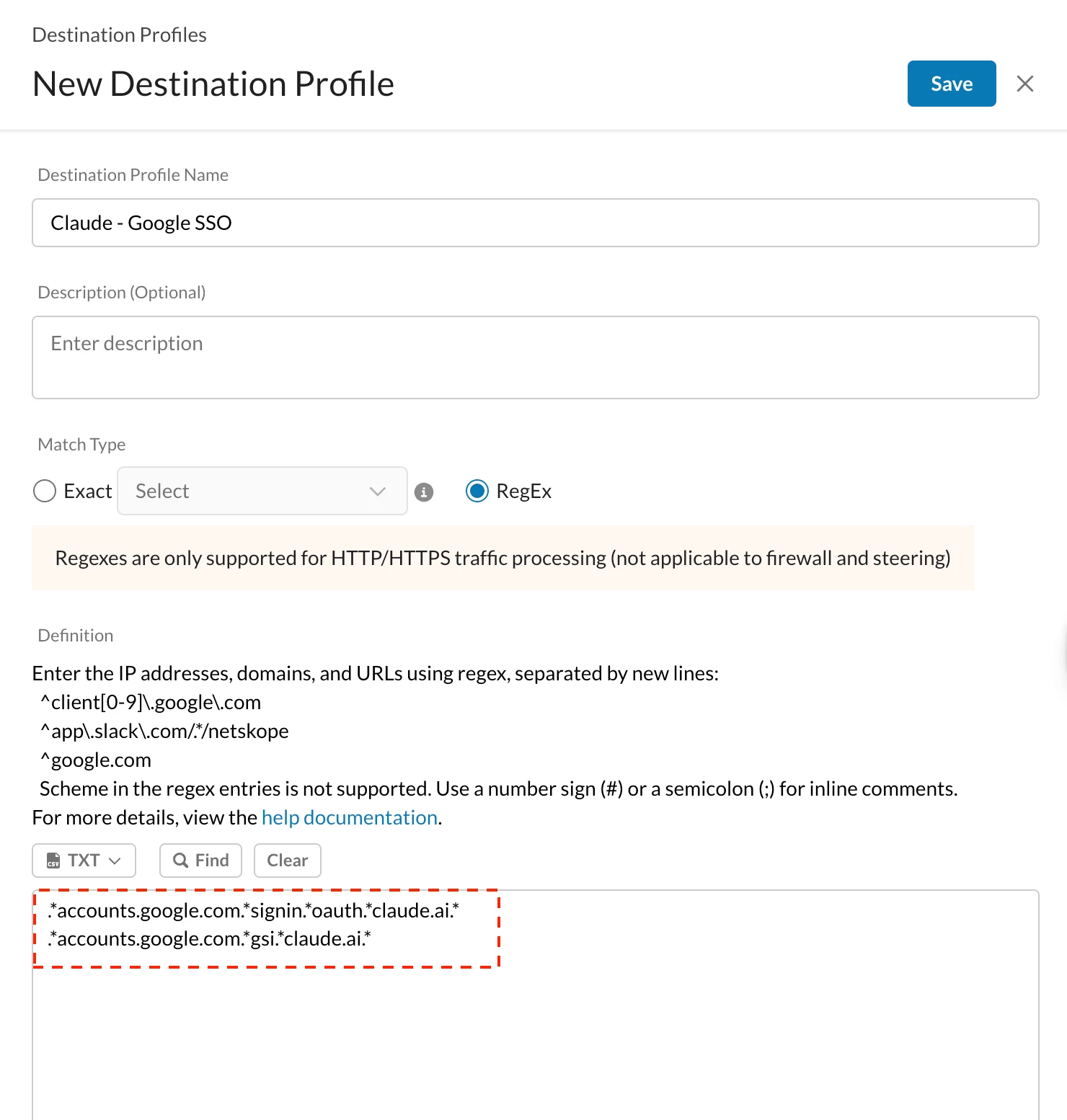
Path: Netskope Tenant UI >>> Policies >>> Profile - - - Custom Categories
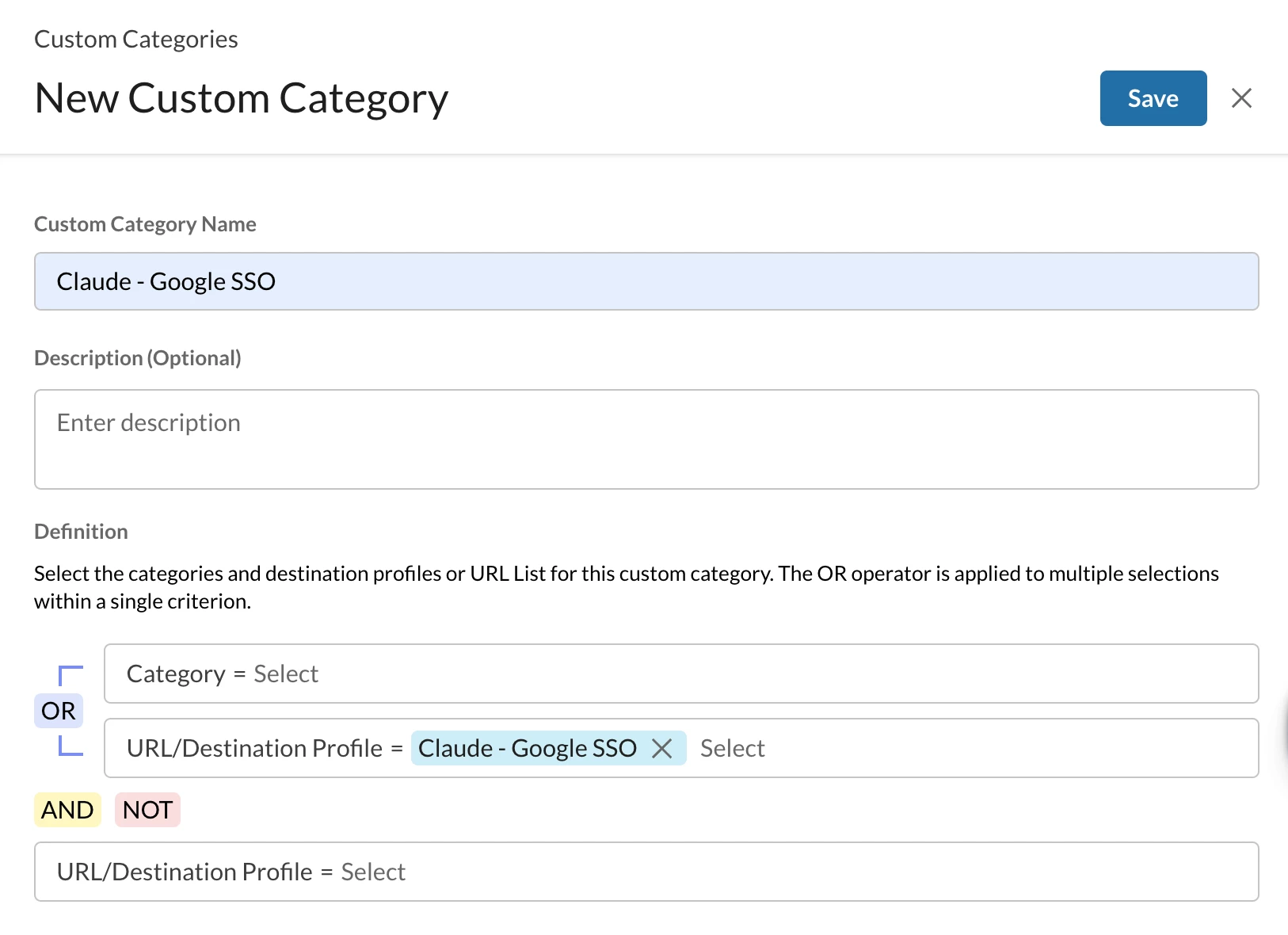

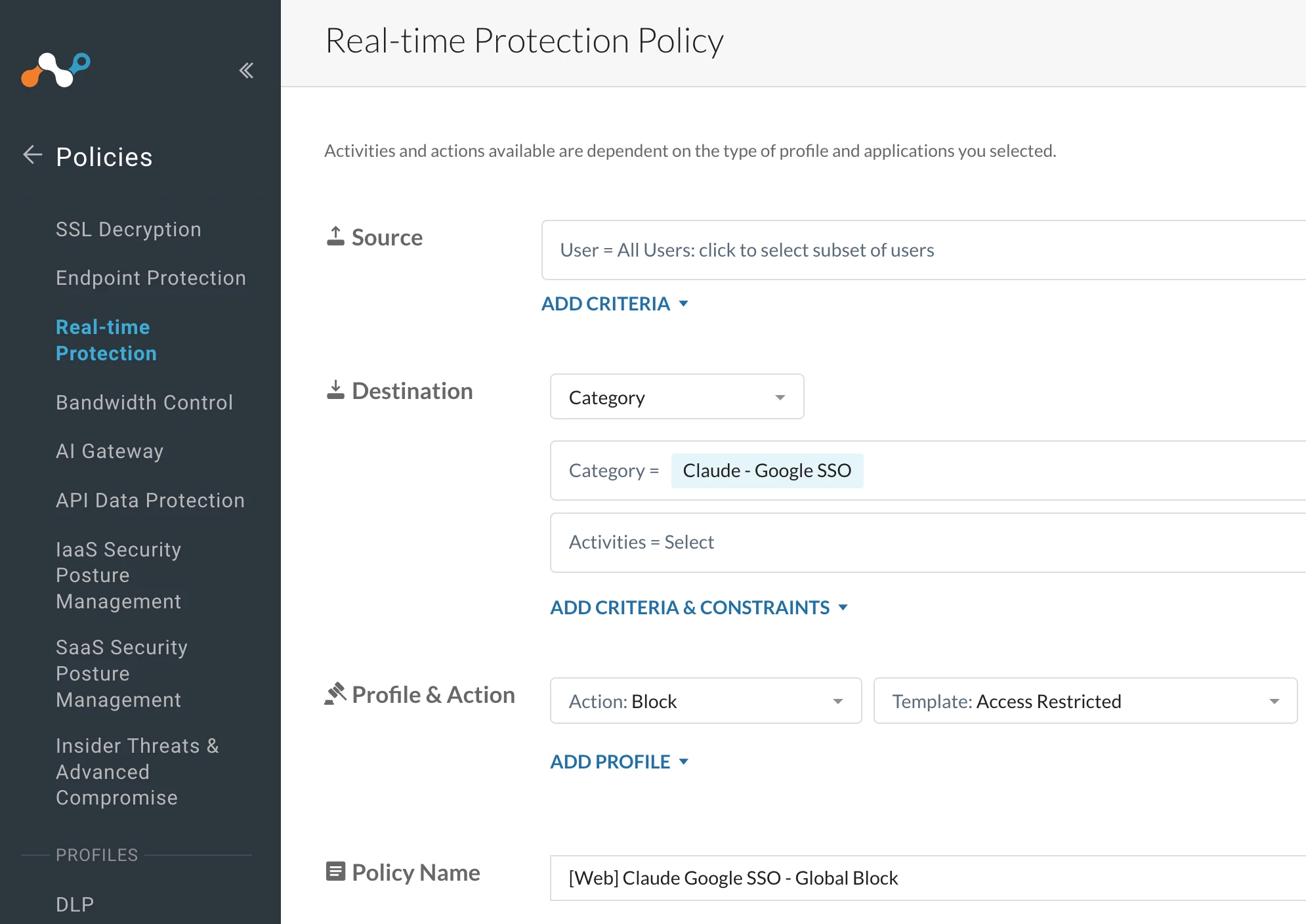
Step 2: Create a Real-time Protection Policy
Path: Netskope Tenant UI >>> Policies >>> Real-time Protection >>> New Policy

Verification
- Continue with Google: Access Anthropic Claude and attempt to log in using Google’s Single Sign-On (SSO).
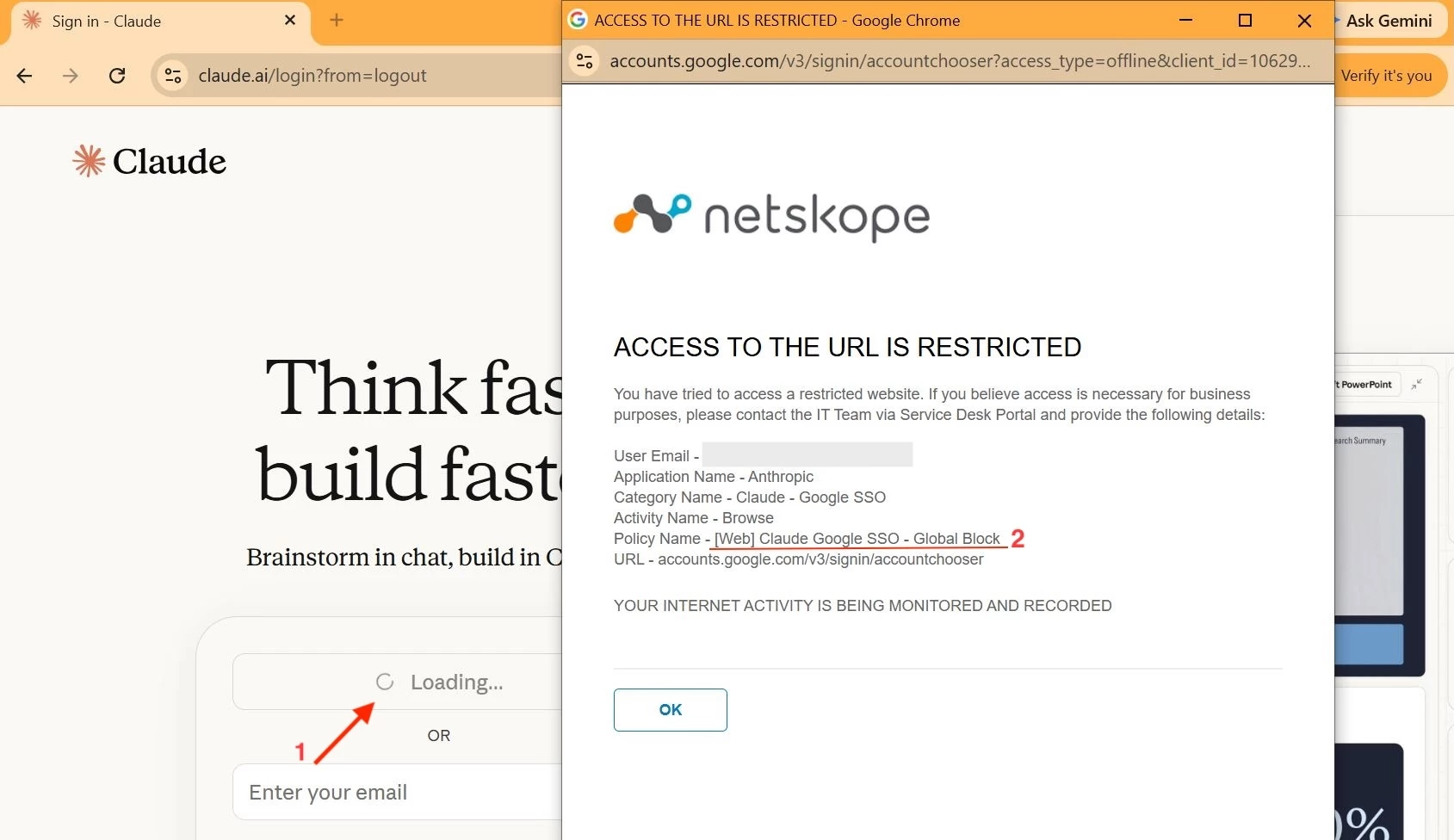
Note - User Notification format used above Link
- Google SignIn Prompt: This option to login will not appear anymore.
Terms and Conditions
- All documented information undergoes testing and verification to ensure accuracy.
- In the future, it is possible that the application's functionality may be altered by the vendor. If any such changes are brought to our attention, we will promptly update the documentation to reflect them.
Notes
- This article is authored by Netskope Global Technical Success (GTS).
- For any further inquiries related to this article, please contact Netskope GTS by submitting a support case with 'Case Type – How To Questions'.



