




Netskope Global Technical Success (GTS)
How to Enable DLP on the ChatGPT Native macOS Desktop App
Netskope Cloud Version - 135
Note : This configuration and fix were tested only on ChatGPT macOS version 1.2026.048. OpenAI may change TLS pinning, remove the NSUserDefaults override, or update the compiled SPKI hash list in future releases. If ChatGPT updates, rerun the strings extraction command to verify the key remains in the binary and refresh the hash list before reapplying the fix.
Overiview
The ChatGPT macOS desktop app implements TLS certificate pinning. When Netskope performs SSL inspection, it presents its own Root CA certificate which ChatGPT does not recognise and the app refuses to start with a certificate error.
The standard fix is to add ChatGPT to a Cert Pinned App steering exception which bypasses Netskope entirely and gives zero DLP visibility. This guide documents an alternative approach discovered through binary analysis that allows full SSL inspection to remain active
Prerequisites
Before applying the TLS certificate pinning fix, block the QUIC traffic.
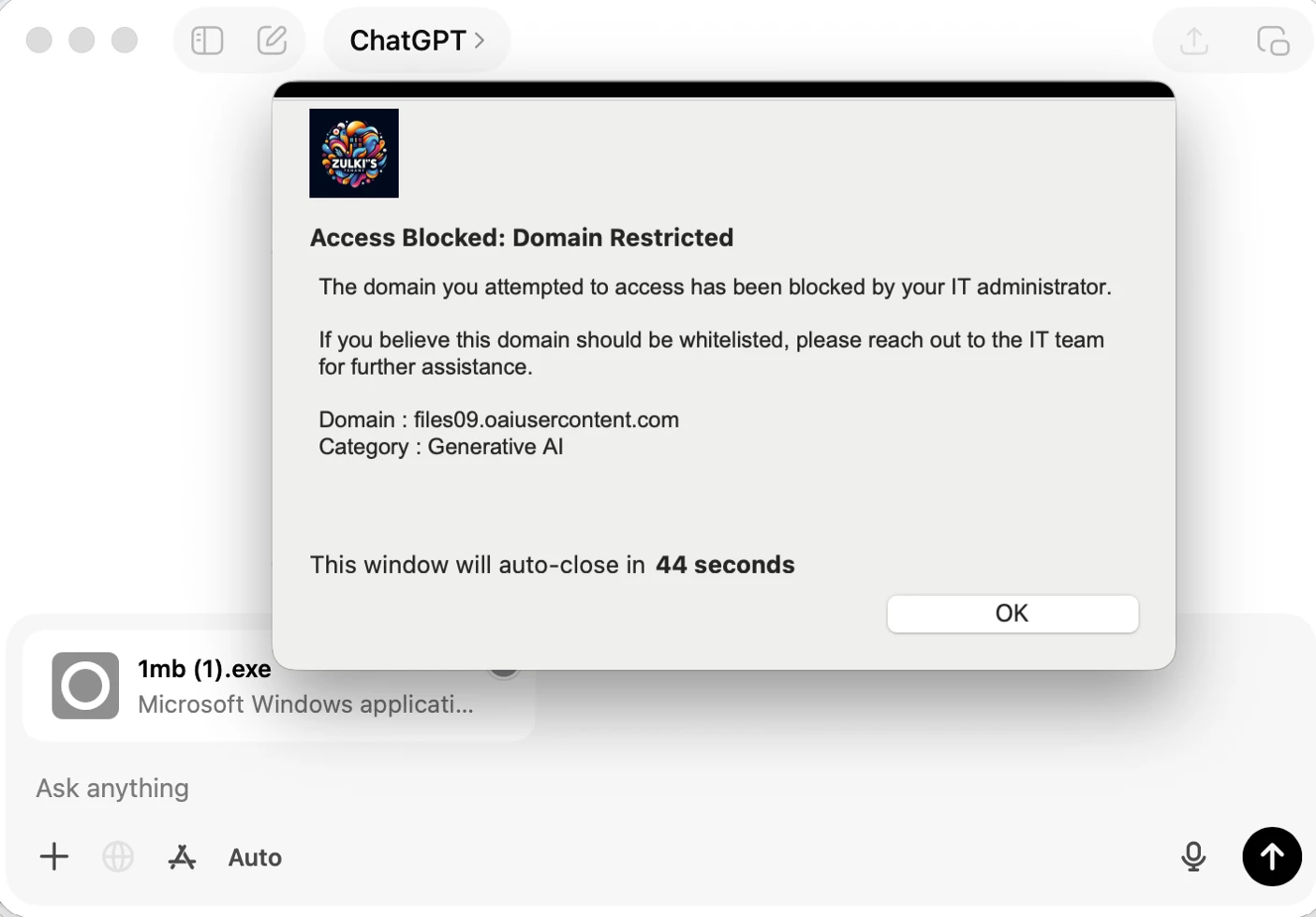
ChatGPT uses QUIC (HTTP/3 over UDP 443) for file transfers .Blocking it ensures complete DLP coverage across all file types.
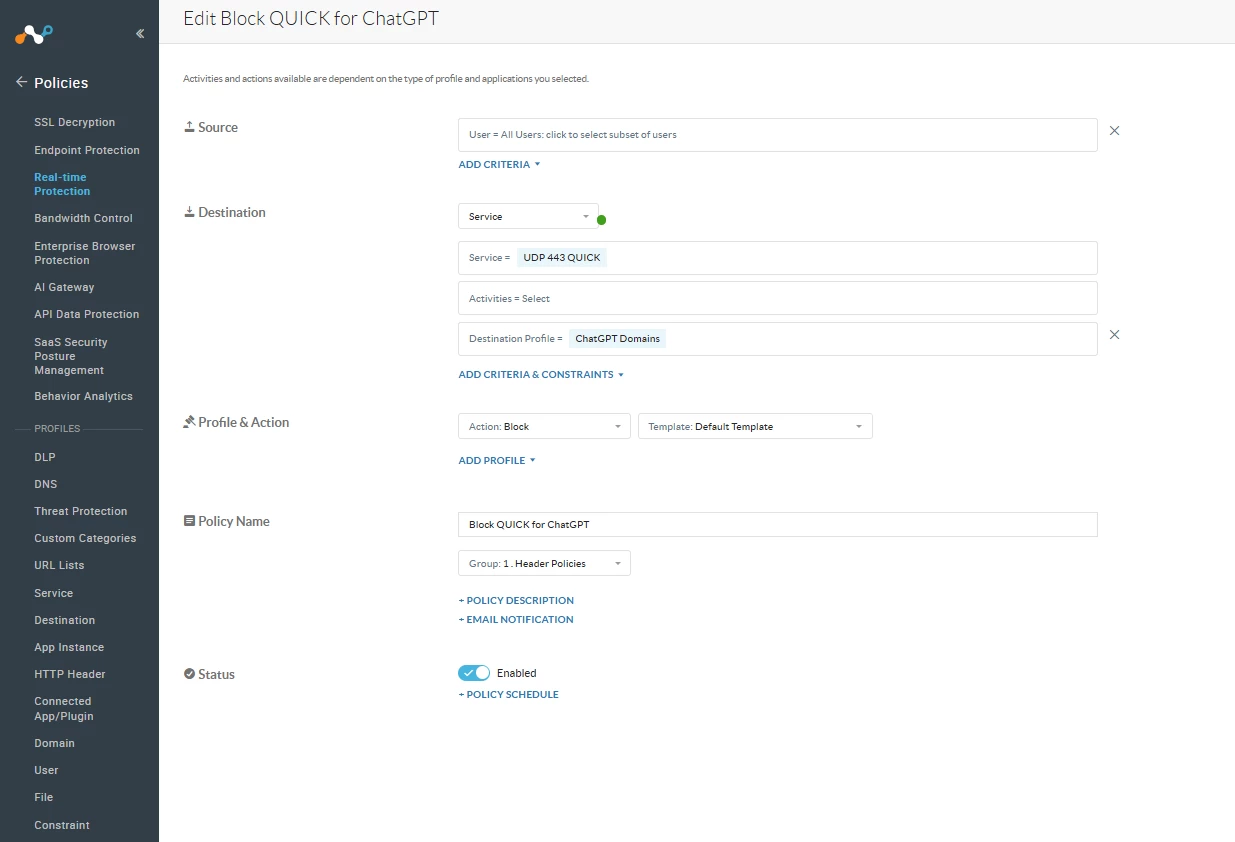
Option A — Block QUIC at the Netskope Policy Level ( CFW license required)
With a CFW license, create a Real-time Protection policy targeting the ChatGPT destination profile, set the service to UDP 443 (QUIC), and set the action to Block.
ChatGPT Domains : https://help.openai.com/en/articles/9247338-network-recommendations-for-chatgpt-errors-on-web-and-apps
Option B — Block QUIC at the macOS OS Level
For environments without a CFW license, QUIC can be blocked on the endpoint itself using the macOS packet filter (pf). This forces ChatGPT to fall back to TCP 443, which Netskope fully inspects.
Run the following commands on the endpoint:
sudo sh -c 'echo "block out proto udp to any port 443" > /tmp/pf_quic_block.conf'
sudo pfctl -f /tmp/pf_quic_block.conf
sudo pfctl -e
Verify the rule is active:
sudo pfctl -sr
Expected output:
block drop out proto udp from any to any port = 443
To revert: run sudo pfctl -d. File uploads will bypass Netskope DLP again once pf is disabled.
Configuration
Netskope Policy:

ChatGPT reads its trusted certificate hash list from NSUserDefaults at runtime. Writing a new value to this key overrides the binary-compiled list entirely. The steps below add the Netskope CA hash to the front of this list so that ChatGPT trusts the Netskope Root CA alongside its existing trusted CAs.
Step 1 — Compute the Netskope CA SPKI Hash
The Netskope Root CA certificate is installed by the Netskope client at a known path. Compute its SPKI SHA-256 hash using the following command:
SPKI=$(openssl x509 -in "/Library/Application Support/Netskope/STAgent/data/nscacert.pem" \
-pubkey -noout | openssl pkey -pubin -outform DER | \
openssl dgst -sha256 -binary | base64) && echo "Netskope SPKI hash: $SPKI"
Example output from a test environment:
Netskope SPKI hash: 4k+B8b/5D4KucieZ5xxxxxxxxxxxxxxxxkwhf4e94=
Step 2 — Check for an Existing NSUserDefaults Key
Before writing, confirm whether the key already exists:
defaults read com.openai.chat com.openai.pinned_cert_hash_list
Step 3 — Write the Netskope Hash to NSUserDefaults
Write the Netskope hash prepended to all existing binary hashes. Replace the first entry in the command below with your computed Netskope hash:
defaults write com.openai.chat com.openai.pinned_cert_hash_list -array \
"<YOUR_NETSKOPE_SPKI_HASH>" \
"C5+lpZ7tcVwmwQIMcRtPbsQtWLABXhQzejna0wHFr8M=" \
"diGVwiVYbubAI3RW4hB9xU8e/CH2GnkuvVFZE8zmgzI=" \
"x+C0kJ2uYxDLS5lLqDkAFQRmwWLeak0Kk1WsiuDRnZ4=" \
"Y9mvm0exBk1JoQ57f9Vm28jKo5lFm/woKcVxrYxu80o=" \
"r/mIkG3eEpVdm+u/ko/cwxzOMo1bk4TyHIlByibiA5E=" \
"i7WTqTvh0OioIruIfFR4kMPnBqrS2rdiVPl/s2uC/CY=" \
"uUwZgwDOxcBXrQcntwu+kYFpkiVkOaezL0WYEZ3anJc=" \
"NfU84SZGEeAzQP434ex9TMmGxWE9ynD9BKpEVF8tryg=" \
"svcpi1K/LDysTd/nLeTWgqxYlXWVmC8rYjAa9ZfGmcU=" \
"I/Lt/z7ekCWanjD0Cvj5EqXls2lOaThEA0H2Bg4BT/o=" \
"8ca6Zwz8iOTfUpc8rkIPCgid1HQUT+WAbEIAZOFZEik=" \
"Fe7TOVlLME+M+Ee0dzcdjW/sYfTbKwGvWJ58U7Ncrkw=" \
"WoiWRyIOVNa9ihaBciRSC7XHjliYS9VwUGOIud4PB18=" \
"Wd8xe/qfTwq3ylFNd3IpaqLHZbh2ZNCLluVzmeNkcpw=" \
"K87oWBWM9UZfyddvDfoxL+8lpNyoUB2ptGtn0fv6G2Q=" \
"cGuxAXyFXFkWm61cF4HPWX8S0srS9j0aSqN0k4AP+4A=" \
"fg6tdrtoGdwvVFEahDVPboswe53YIFjqbABPAdndpd8=" \
"aCdH+LpiG4fN07wpXtXKvOciocDANj0daLOJKNJ4fx4=" \
"Ko8tivDrEjiY90yGasP6ZpBU4jwXvHqVvQI0GS3GNdA=" \
"gI1os/q0iEpflxrOfRBVDXqVoWN3Tz7Dav/7IT++THQ=" \
"AG1751Vd2CAmRCxPGieoDomhmJy4ezREjtIZTBgZbV4=" \
"58qRu/uxh4gFezqAcERupSkRYBlBAvfcw7mEjGPLnNU=" \
"grX4Ta9HpZx6tSHkmCrvpApTQGo67CYDnvprLg5yRME=" \
"ICGRfpgmOUXIWcQ/HXPLQTkFPEFPoDyjvH7ohhQpjzs=" \
"x4QzPSC810K5/cMjb05Qm4k3Bw5zBn4lTdO/nEW/Td4=" \
"hxqRlPTu1bMS/0DITB1SSu0vd4u/8l8TjPgfaAp63Gc=" \
"Vfd95BwDeSQo+NUYxVEEIlvkOlWY2SalKK1lPhzOx78=" \
"QXnt2YHvdHR3tJYmQIr0Paosp6t/nggsEGD4QJZ3Q0g=" \
"mEflZT5enoR1FuXLgYYGqnVEoZvmf9c2bVBpiOjYQ0c=" \
"CLOmM1/OXvSPjw5UOYbAf9GKOxImEp9hhku9W90fHMk=" \
"LdSH9FFXssRXCky9fBfZkelEXY55eYitehEwbnZjGmE=" \
"Xxhhbjq3NEImgVIfGzx+Ubl6ebJS1kwRjV/2YlHJ3Zs=" \
"7LXacUIOxheqMpwcwCIc2JZSVNjHLEo2Avbn1i5AQ8w="
Step 4 — Verify the Write
Confirm the key was written correctly and the Netskope hash appears at position 1:
defaults read com.openai.chat com.openai.pinned_cert_hash_list
Expected output — an array of entries starting with the Netskope hash:
(
"<YOUR_NETSKOPE_SPKI_HASH>",
"C5+lpZ7tcVwmwQIMcRtPbsQtWLABXhQzejna0wHFr8M=",
...
)
Step 5 — Restart ChatGPT
The app must be fully quit and relaunched for the NSUserDefaults override to take effect:
osascript -e 'quit app "ChatGPT"' && sleep 2 && open -a ChatGPT
Verification:
File upload test:
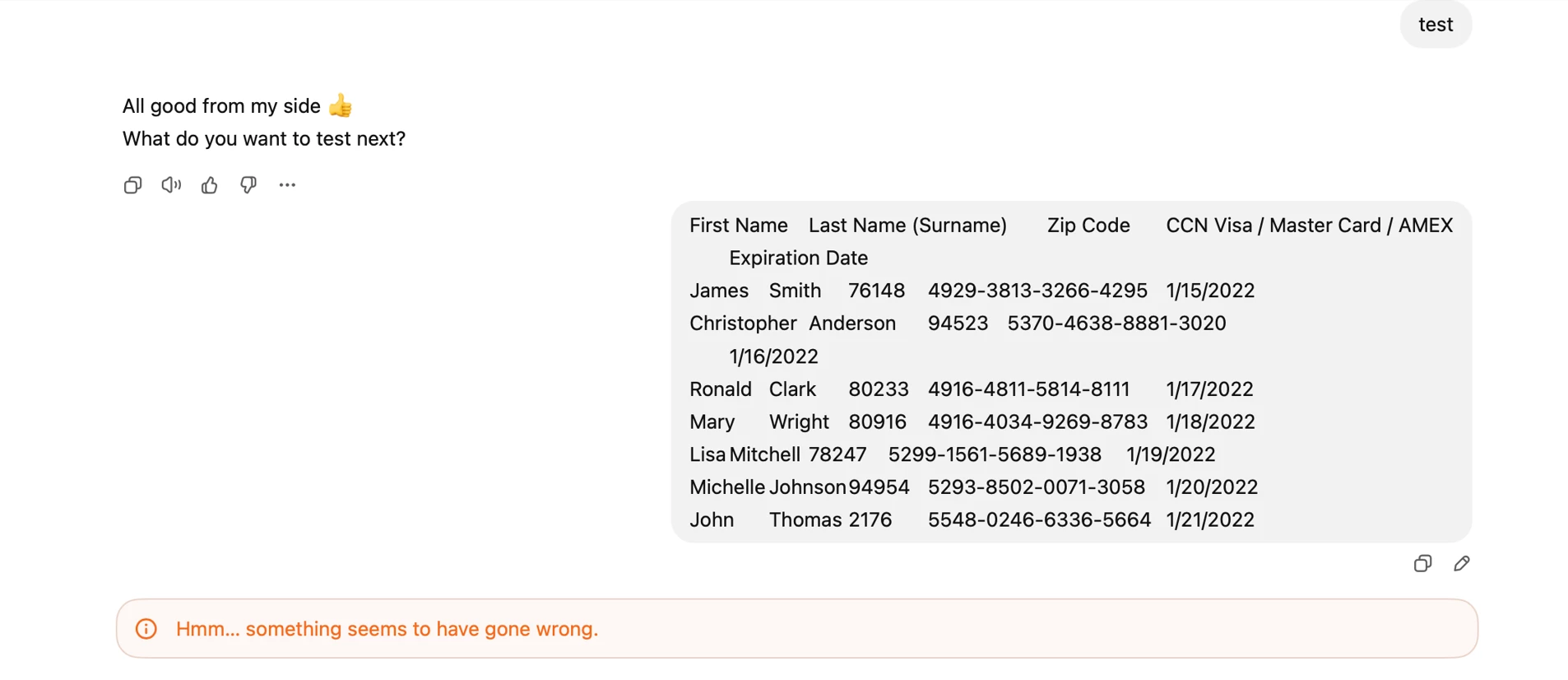
Sample PCI test:
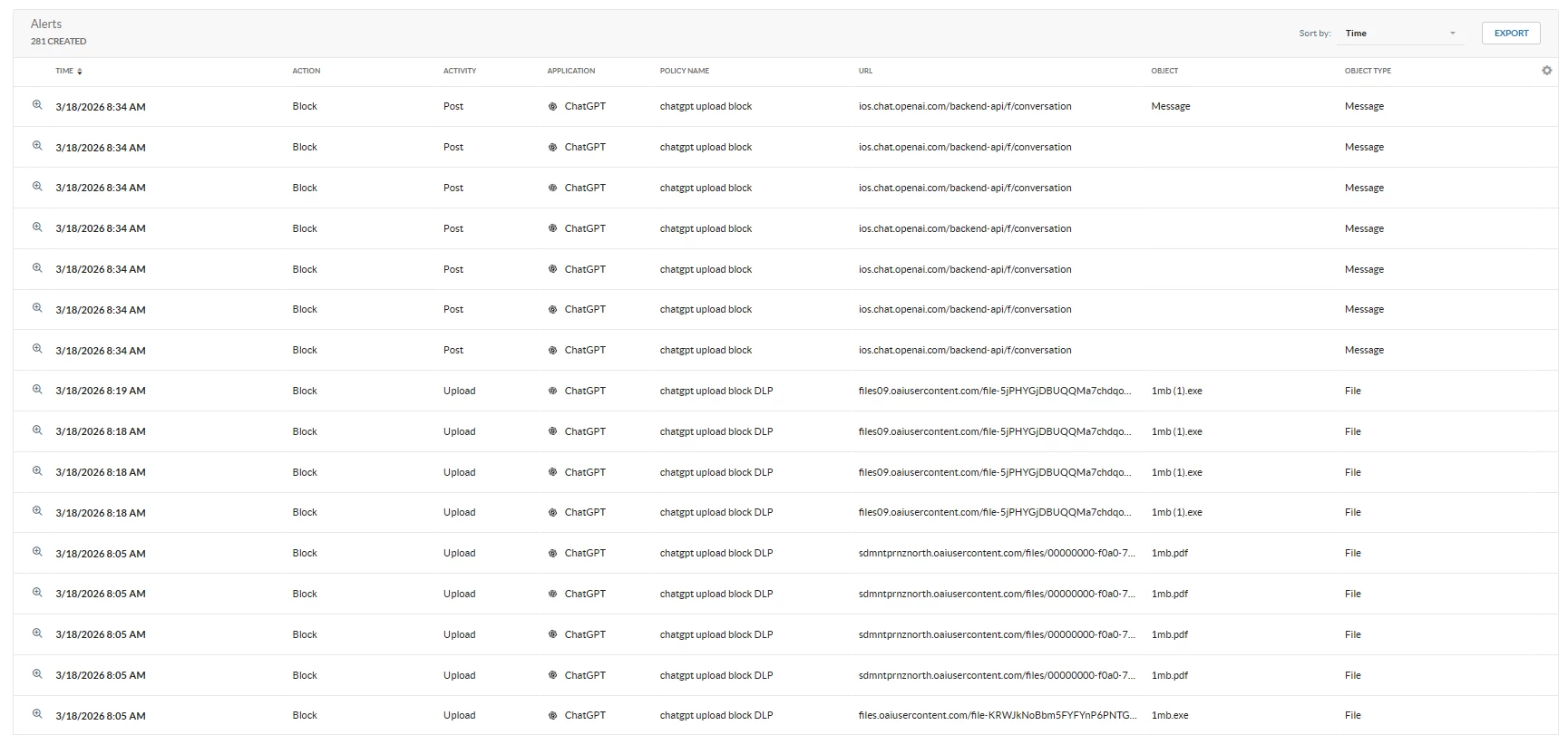
Netskope logs:
Terms and Conditions
- All documented information undergoes testing and verification to ensure accuracy.
- In the future, it is possible that the application's functionality may be altered by the vendor. If any such changes are brought to our attention, we will promptly update the documentation to reflect them.
Notes
- For any further inquiries related to this article, please contact Netskope GTS by submitting a support case with 'Case Type – How To Questions'.



