



Solved

Internal and External server same name

  • Apr 25, 2023 6:27 PM UTC
  • 8 replies
  • 367 views

barrycuda72
Forum|alt.badge.img+5

New user to Netskope so apologies if this has been answered.

I have an internal application with an Admin page that can be access via port 8383.

This application has a public address for client apps to communicate with when they are not in the building.  The Admin page is not available when you are using the External address.

Example:

Internal  App.Test.com  IP 192.1.1.1

External App.Test.com. IP 35.1.1.1

We configured this as a Private App, however the admin page does not work and from what I can tell from the logs Netskope is using the External address.  If I use the IP address instead of the FQDN internally it works.   Any thoughts?
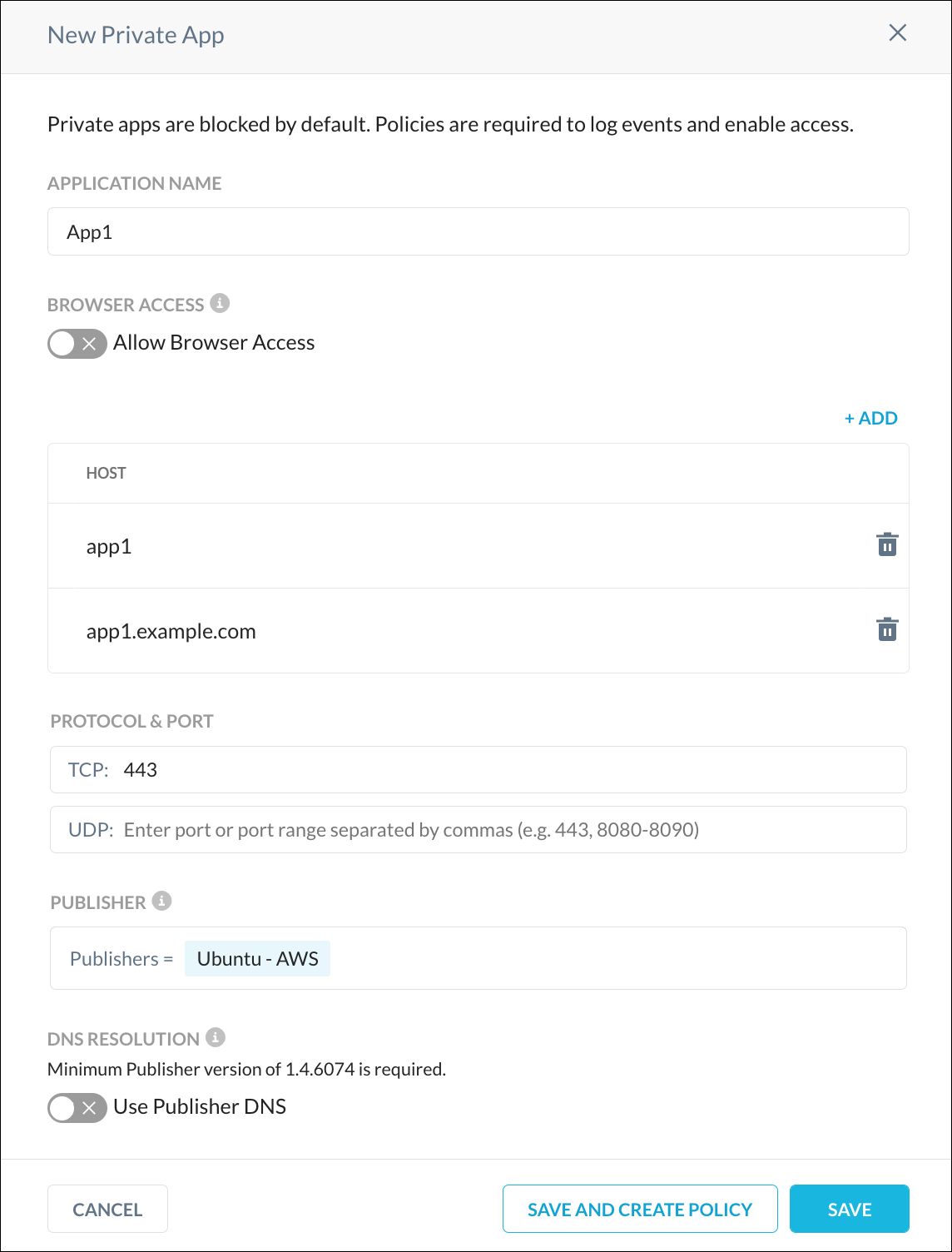
Best answer by qyost


When defining your private app, there is an option to "Use Publisher DNS".   That should move the resolution to the internal DNS servers for you.

View original
This topic has been closed for replies.

8 replies

qyost
Forum|alt.badge.img+16
  • Explorer III
  • Answer
  • Apr 25, 2023 6:44 PM UTC


When defining your private app, there is an option to "Use Publisher DNS".   That should move the resolution to the internal DNS servers for you.


barrycuda72
Forum|alt.badge.img+5
  • Author
  • New Member
  • Apr 25, 2023 7:00 PM UTC

Dang that was an easy fix..  Thank you


qyost
Forum|alt.badge.img+16
  • Explorer III
  • Apr 25, 2023 7:01 PM UTC

Welcome to the community. 


Forum|alt.badge.img+12
  • Explorer
  • Apr 25, 2023 8:18 PM UTC

But this should works without using the internal dns option. Netskope should be intercepting that fqdn. What we found is that blocking dns over https is usually the cause for this. We’ve deployed a simple utility policy in Netskope to do this and all our NPA fqdn intercepting works now. 


barrycuda72
Forum|alt.badge.img+5
  • Author
  • New Member
  • Apr 28, 2023 4:11 PM UTC

I have a follow up question.  On a different app we are seeing where the private app only works when we disable dns over https in the browser.   How would I do that in Netskope?


Forum|alt.badge.img+12
  • Explorer
  • Apr 28, 2023 4:14 PM UTC

You can accomplish this with a simple Real-time Protection Policy. “DNS over HTTPS” is an application in the list. Just create a policy to block it with no notification. In fact, I’m under the impression this is standard policy deployment for new customers by their SE’s now. 


barrycuda72
Forum|alt.badge.img+5
  • Author
  • New Member
  • Apr 28, 2023 4:25 PM UTC

That worked like a charm


Rohit_Bhaskar
Netskope Employee
Forum|alt.badge.img+20
  • Netskope Employee
  • Apr 28, 2023 5:25 PM UTC
Please mark the comments as a accepted solution for your question